Summary Data Sources
Count and total records with one SOQL GROUP BY query: Cases by Status, Opportunity Amount by Stage, or a single count for an account.
A Summary counts or totals records in the database instead of fetching them, for example Cases by Status, total Opportunity Amount by Stage, or a single case count for an account. Because the database does the arithmetic, the result covers every matching record. It is not limited by LIMIT or the 5-row preview.
Summaries are new in 1.13.0. In an org upgraded from 1.12.0 or older, an administrator must first add the Summary value to the Role picklist. See Upgrade Notes: ZeroExport 1.13.
Add a Summary
- To summarize children of the primary record, use New Data Source and choose the role Summary (SOQL GROUP BY).
- To summarize children of each record in a Child Query or Nested Child source, use Add Child on that source and choose Summary.
A Summary is anchored to the primary record, or to each record of a child source, through a lookup on the summarized object.
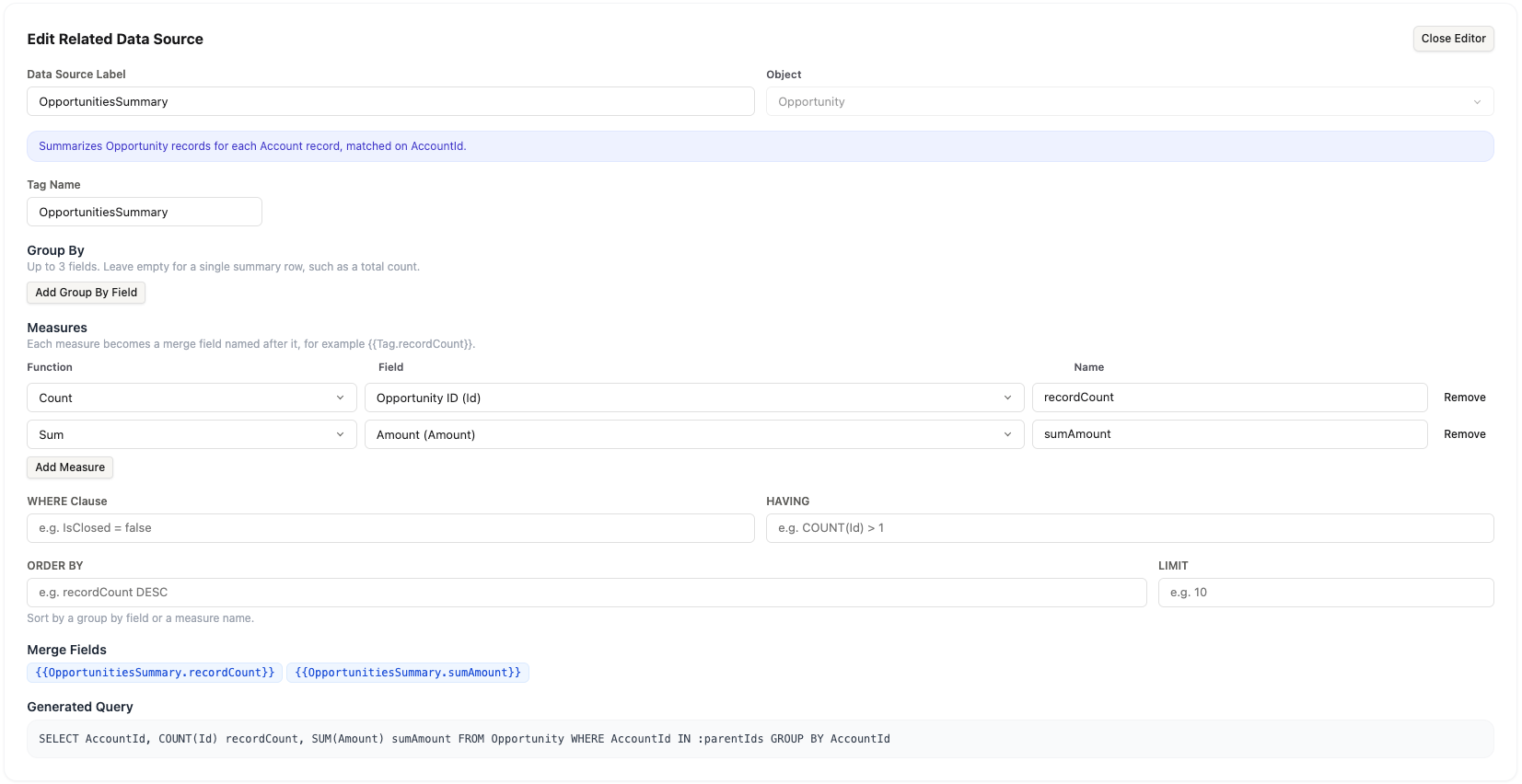
Settings
| Setting | What it does |
|---|---|
| Tag Name | The merge field prefix, for example CasesByStatus |
| Group By | Up to 3 fields on the summarized object. Leave empty for a single row |
| Measures | Up to 10, written FUNCTION(field) name, for example COUNT(Id) caseCount |
| WHERE | Filters records before they are grouped |
| HAVING | Filters groups, written as an expression such as COUNT(Id) > 1 |
| ORDER BY | Group by fields or measure names, for example caseCount DESC |
| LIMIT | Maximum number of groups for each record the Summary is attached to |
Measure functions are COUNT, COUNT_DISTINCT, SUM, AVG, MIN and MAX. SUM and AVG need a number, currency or percent field. Every measure needs a name, and the name becomes the merge field. A name cannot repeat, match a group by field, or be a reserved word such as count or sum. The editor shows the merge fields the Summary provides and the query it will run.
Use a Summary in a document
With group by fields, a Summary is a list and repeats table rows like any other list:
| Status | Cases |
|---|---|
{{CasesByStatus.Status}} | {{CasesByStatus.caseCount}} |
Without group by fields it is a single row, so {{CaseStats.caseCount}} can be used anywhere, including visibility conditions.
A Summary under a child source is available under each parent record, like a nested list, and as one flat list under its own tag name.
Empty results
- A grouped Summary that matches nothing is an empty list, so its rows print nothing.
- A single-row Summary prints
0for counts and sums and leaves other measures blank. - With HAVING, a single-row Summary leaves every measure blank, because the row may have been filtered out rather than matching nothing.
- Currency sums print as currency.
Record Scope = Multiple
In a template with Record Scope = Multiple, each primary record carries its own Summaries. Inside a row that repeats over the primary, or over the child source the Summary is anchored to, a grouped Summary repeats as a nested list and a single-row Summary gives that record's values.
A single-row Summary under a child source has values only inside such a row, so a template that uses it anywhere else fails to save.
Checks and limits
- A tag that clashes with another source or field, an anchor that cannot anchor, or a measure on a field that cannot be aggregated is rejected when the template is saved.
- A query returns at most 2,000 rows. A result that reaches the cap fails with an error naming the Summary instead of being cut short.
- Group by fields must be fields on the summarized object itself, not related fields such as
Account.Name. - Picklist groups show the stored value.
- In orgs with multiple currencies, currency totals are in the corporate currency.
- Every record a Summary counts or totals counts toward the 50,000 query row limit, even though only the groups are returned. Use a WHERE clause to keep very large summaries in range.
- WHERE and HAVING can use
{{Alias.Field}}values only from a source that holds one record, such as the primary in a single-record template. - All Summary queries run in user mode.
Summary or table grouping?
A Summary counts records the database groups for you, even records the document never lists. Table grouping groups the rows a table already prints and can merge cells and add subtotal rows. Use a Summary for counts and totals of records you do not list, and table grouping to organize the rows you do.