Iterations
Repeat table rows and list items once per child record — including nested parent-child hierarchies, row numbering, and scoped subtotals.
Iteration is how a single template row turns into many rows at generation time. When an element contains a merge token that points at a collection of child records — the line items under an opportunity, the contacts under an account — that element repeats once per record.
You do not configure anything special: iteration happens automatically wherever a child-record token appears. This page explains the behavior so you can design templates around it.
Repeating table rows
In a Table, put a child-record token in a body row. That row expands into one row per record.
| Product                              | Qty                            | Amount                          |
|--------------------------------------|--------------------------------|---------------------------------|
| {{OpportunityLineItem.Product2.Name}}| {{OpportunityLineItem.Quantity}}| {{OpportunityLineItem.TotalPrice}}|
With three line items on the record, this renders three body rows.
Header rows stay static. Any rows above the first row that contains a child token are treated as headers and rendered once, as-is.
 A single template body row expands into one row per line item; the header row is kept once.
Repeating list items
A List item containing a child token expands the same way — one bullet per record.
• {{Contacts.Name}} — {{Contacts.Title}}
renders one bullet for each contact returned.
 A list item expands into one entry per child record.
Nested (parent-child) hierarchies
Iterations nest. A table can list each parent record followed by its own children — for example, each opportunity followed by that opportunity's line items. Each level expands within the scope of its parent, so inner rows only show records belonging to the current outer record.
This works up to four levels below the primary object (for example Account → Position → Lot → Transaction), with each level scoped to the one above it. A data source nested deeper than that is rejected when the template is saved.
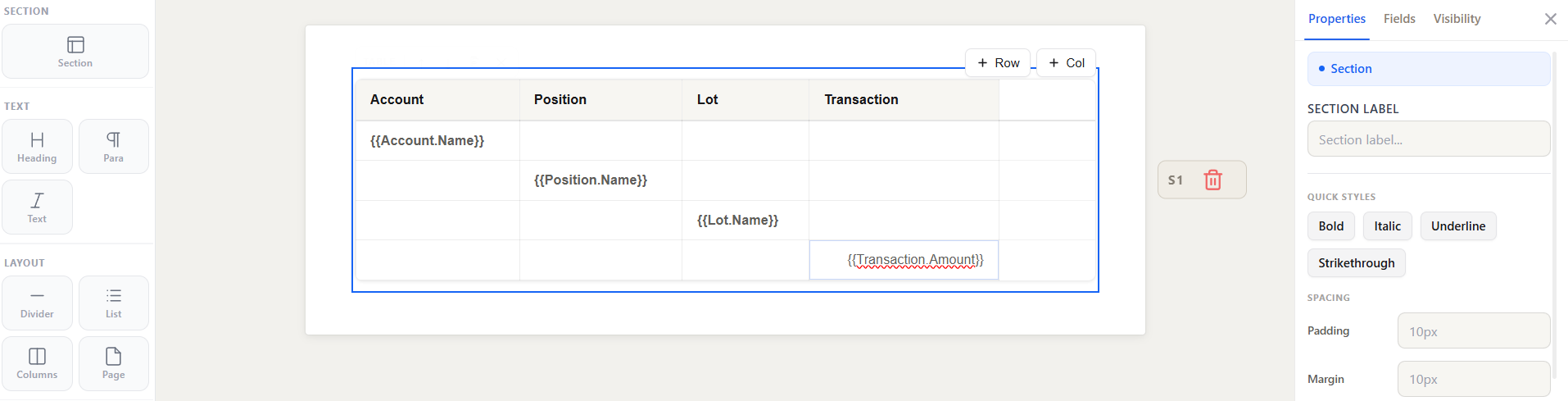 A two-level table: each opportunity row is followed by its own line-item rows.
Row numbering with index
Inside a repeating element, the index token gives the current record's 1-based position:
{{Contacts.index}}. {{Contacts.Name}}
renders 1. Ada Lovelace, 2. Alan Turing, and so on. Use it for numbered lists or a "#" column in a table.
Subtotals and aggregates
Aggregate tokens (count, sum, min, max, avg) summarize a collection into one value, and they are scoped correctly inside iterations. A subtotal placed inside a per-opportunity group sums only that opportunity's own line items, while a grand total placed outside sums across all of them.
Subtotal for this opportunity: {{OpportunityLineItem.sum(TotalPrice)}}
Grand total: {{Opportunities.sum(OpportunityLineItem.TotalPrice)}}
See Merge Field Syntax → Aggregates for the full list.
Total rows after a grouped table
In a table grouped by a list (for example projects with their tasks), rows after the first repeating row used to repeat for every outer row. Since 1.10.0, once the template is saved:
- trailing rows with the Total role print once, after all the groups, using the whole document's data
- trailing rows with the Subtotal role print once after each outer row's nested rows
Set the role from the Row section of the Properties panel, which says which role closes which level. Versions saved before 1.10.0 keep the old behavior until you open and save them.
Since 1.11.0:
- Inside a level (an account's deals) a Total row closes the level like a Subtotal row, so an account's total row can have either role.
- A row that holds a field of the rows it would close, such as a deal's total row showing the deal's amount, stays with its rows and prints for each of them, whatever its role. Only a row that holds aggregates and fields of its parent, such as an account's total, closes the group. This holds under any name of the list (
{{Opportunities.Amount}}or{{Opportunity.Amount}}).
Hide a closing row when there are no rows above it
A Subtotal or Total row in a grouped table has the option Hide when there are no rows above it in the Row section. A Subtotal row closes each account, so with the option it is left out for an account with no deals. A Total row closes the table, so it is left out when the table prints no rows. Each level has its own setting. Without the option nothing changes. This applies to generated documents and to the builder preview.
Rows that use the same list
A table with a line row and a total row that both repeat over the same list prints a block per item: each item's line, then its total. Before 1.11.0 it printed all the lines and then all the totals.
- The rows from the first to the last use of the list print together for each item, with or without a merged cell, and inside grouped and nested tables.
- Fixed rows between them print with each item. A fixed row after the last use still prints once below the items.
- A row with a visibility rule or a merge-with-child-rows column has no block. A block stops at a row below it that has a visibility rule or a merge of its own, or that repeats over another list.
Save the template once after upgrading to 1.11.0 to get this. See Compiled Templates.
Empty collections
If a parent has no matching child records, the repeating rows or list items simply produce no output — no empty row, no error. If you need a "no records" message, add it as a separate element with a conditional visibility rule that shows when the collection is empty.
Preview note: In the builder preview, child collections are capped to 5 rows under each parent so previews stay fast. The full set is rendered when the document is generated.
See also
- Conditional Visibility — show or hide repeating elements per record
- Merge Field Syntax — child-record tokens and aggregates
- Edge Cases & Limits — nesting limits and empty-data behavior