Upgrade Notes: ZeroExport 1.12
What to check when upgrading to ZeroExport 1.12: Parent Lookup removal, repeating section changes, table alignment, and custom tag enforcement.
ZeroExport 1.12 (Siddhanta 1.12.0) is a significant release. Most templates continue working without changes. The items below are worth checking before and after the upgrade.
Parent Lookup data sources are removed
What changed: The Parent Lookup data source role is gone. Parent record fields are now selected directly on the primary data source (for example, Account.Name on an Opportunity).
What to do before upgrading: Find any template that uses a Parent Lookup source and move its fields to the primary source. Use Account.Name on the primary Opportunity source instead of a separate Parent Lookup for Account.
What happens if you do not: A Parent Lookup source saved in a template is dropped when the template loads in the builder. Generating a document with one fails with an error naming the source. In a batch generation flow, only that record's output fails; the other records still generate.
The Role picklist value: The Parent Lookup value of the Template Data Source Role field stays active in the org after upgrade. The builder no longer offers it. To hide it from reports and list views, deactivate it in Setup > Object Manager > Template Data Source > Role.
Repeating sections now print each parent's own rows
What changed: A section that repeats over a parent list, with a table of that parent's child rows inside it, now prints each parent's own rows, not every child under every parent.
For example: a section over Opportunities with a table of Opportunity Line Items inside it used to print all line items under every opportunity. It now prints that opportunity's own line items under each one.
This change applies to both the compiled merge and the legacy merge, with no save needed. It takes effect as soon as the upgrade is installed.
What to check: Any template with a table or list of child records inside a section that repeats over a parent list. Review the output after upgrading.
Table alignment changes
What changed:
- New tables start with left-aligned headers. Header Styles H Align defaults to Left instead of Center for new tables. Saved tables keep their own setting.
- Body cells on Auto follow their column header. A cell set to Auto H Align now follows the column header's H Align. Previously, body cells on Auto used the Format Type of their content (numbers right, dates center). Numbers and dates no longer self-align.
- Header Styles do not reach body cells. Previously, Header Styles H Align was applied to body cells on Auto. It now applies only to header cells.
What to check after upgrading: Tables where you expected number or date columns to self-align. Set H Align explicitly on the column header or the cell to restore the previous appearance.
Visibility count rule fix requires a save for older versions
What changed: A visibility rule on a list's count (for example LineItems.count > 0) now scopes correctly to the repeating parent. This is fixed on the compiled merge only.
What to do: For any template version that was saved before the compiled merge was introduced (before 1.9.0), save the template once after upgrading. The legacy merge still hides the node for such rules; a save produces a compiled version that gets the fix.
Custom tag is the only merge name for its source
What changed: Once a data source has a custom tag, saving now rejects merge fields that use the object or relationship name. For example, {{Opportunity.Name}} is rejected if the source's tag is opp. Previously, both names were accepted at save.
What this affects: Only the next save of a template whose merge fields use the old name. Templates that already save continue generating.
What to do: Open the data source editor for each source with a custom tag. If the template uses the old name, the editor shows Replace in template. Click it to rewrite all references, then save.
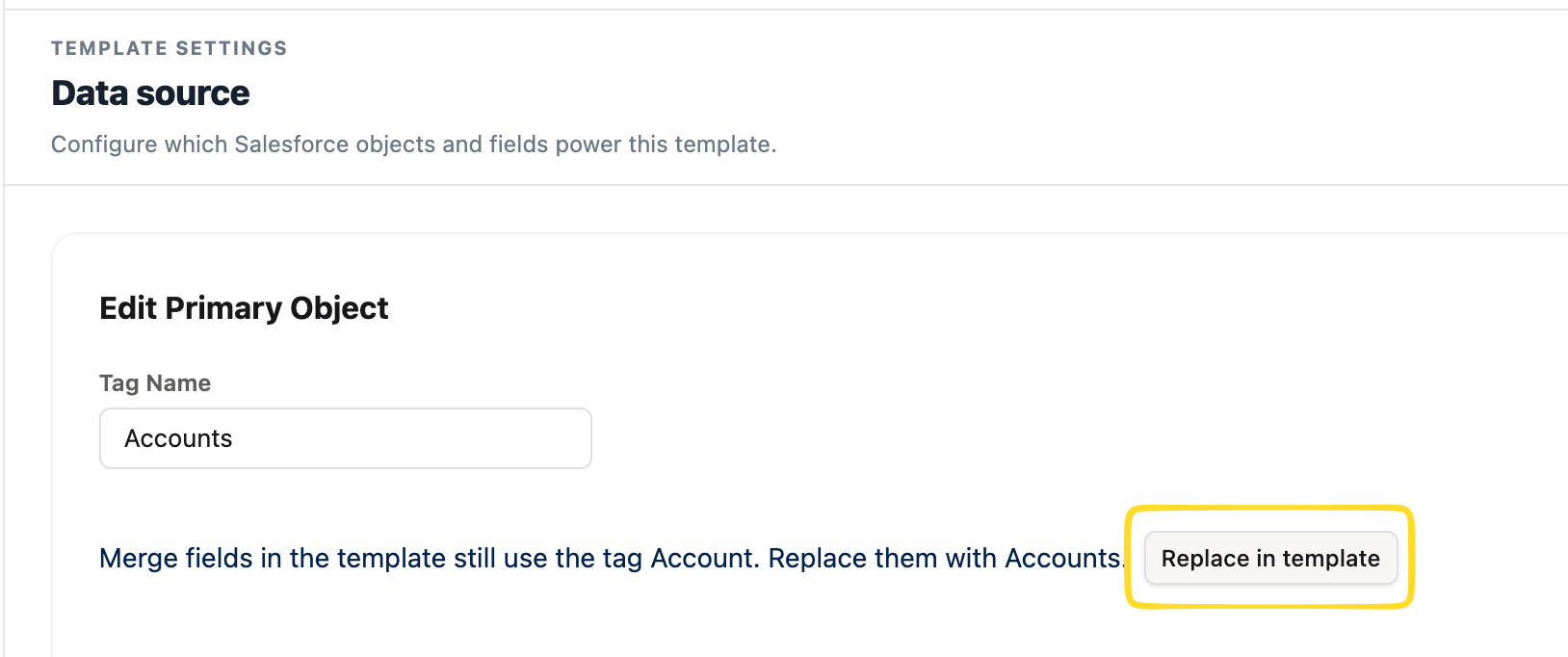 The Replace in template prompt appears when the tag differs from the merge field names currently in use.
Templates that do not have custom tags are not affected.
Demo templates get a new inactive version
Each of the five demo templates still in your org receives a new inactive version with the updated 1.12 content. Your existing versions are unchanged. Activate the new version if you want the fixed content.
If the demo template refresh fails during the upgrade, the upgrade still completes. Create a new template from blank in that case.
Import is for Zero_Export_Admin
The new .zadt import feature requires the ZeroExportImportService class, which Zero_Export_Admin grants. Zero_Export_User accounts do not see the Import button. If you have custom permission sets that should allow import, add ZeroExportImportService to them.
Dialogs now close on Escape and click-outside
All builder dialogs now close and count as Cancel when you press Escape or click outside the dialog. If your team uses keyboard shortcuts and expected Escape to do nothing in dialogs, this is a behavior change.
Data Sources and Template Settings are no longer top tabs
The Data Sources and Template Settings tabs in the builder header are removed. Open data sources from the Data source button in the left rail. Open branding and page setup from the Branding and Page setup buttons in the left rail.
FAQ
Will my existing templates break after upgrading to 1.12?
Most will not. Check templates that use Parent Lookup sources, repeating sections with child tables, tables that relied on number or date auto-alignment, and data sources with custom tags.
Do I need to resave all templates?
No. Only templates saved before 1.9.0 that use a visibility rule on a list count (such as LineItems.count > 0) need one save to get the fix. Templates with custom tags need a save only if their merge fields use the old object name.
What happens to templates that use a Parent Lookup source?
The source is dropped when the template loads in the builder, and generation fails with an error naming it. Move those fields to the primary data source before upgrading.
Who can import .zadt files?
Users with the Zero_Export_Admin permission set. Custom permission sets need the ZeroExportImportService class added.