Complex Table Rendering in Salesforce Documents: Nested Rows, Merged Cells and Subtotals
Why nested tables, vertically merged cells and multi-level subtotals break in most Salesforce document generation tools, and how compiling the table geometry before rendering keeps them intact.
A flat quote table is easy. One row per line item, a total at the bottom, done. Real business documents are rarely that kind. A finance team wants every account listed once, its deals grouped underneath, each deal's line items under that, a subtotal after every deal, and a grand total per account.
That is a table with nested rows, vertically merged cells and aggregates at three different levels. It is also exactly the kind of table that falls apart in a document generation tool that was designed around merging text into a template.
This article shows what that table looks like when it renders correctly, why it is hard, and how the major approaches compare.
What a correct complex table looks like
Here is output generated from Salesforce data: two accounts, four deals, line items for each, a subtotal per deal and a total per account.
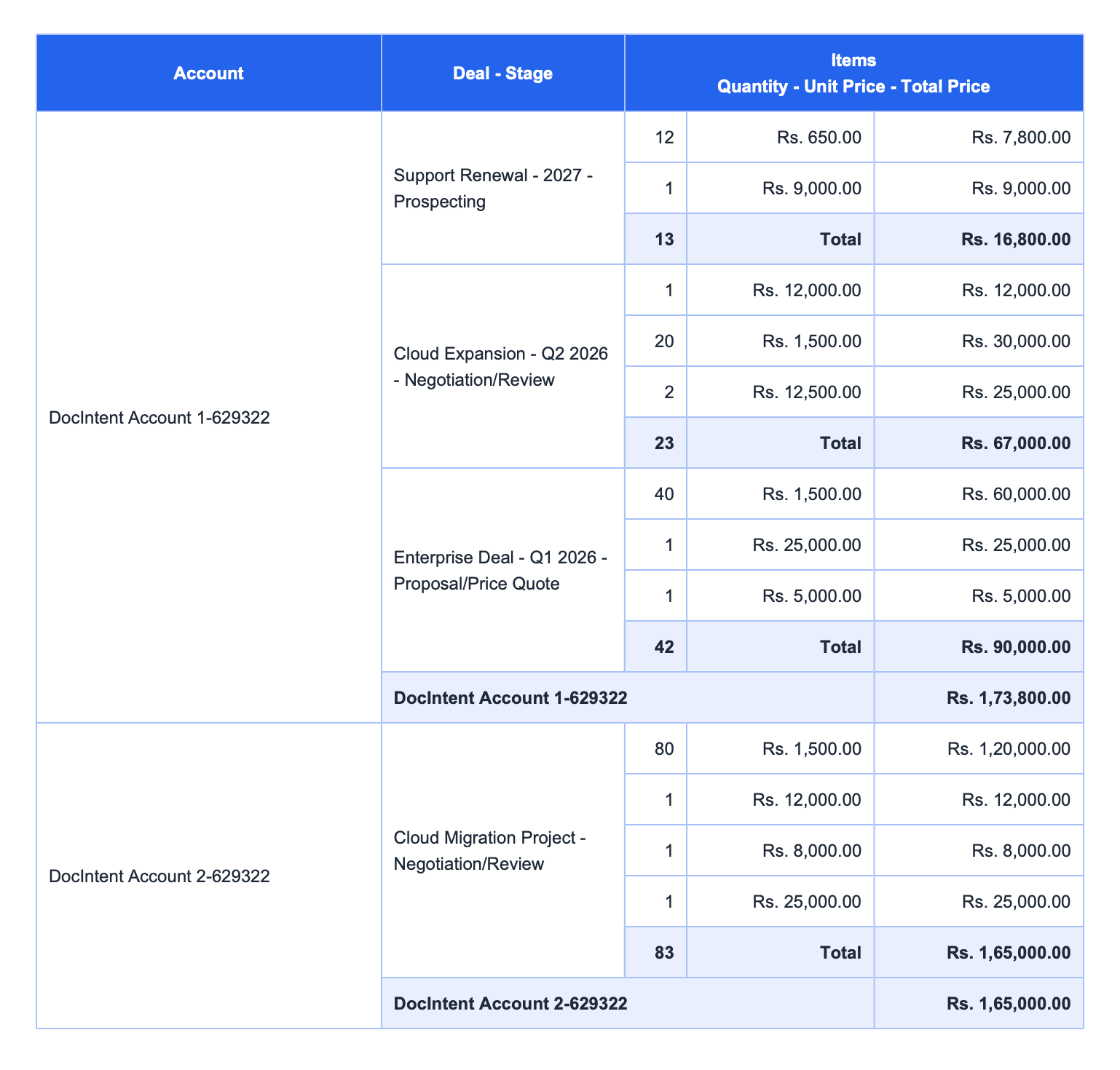 Account → Deal → Line item, with vertically merged parent cells, per-deal subtotals and per-account totals.
Look at what has to be true for this to work:
- The Account cell spans every row beneath it, including the deal subtotals.
DocIntent Account 1-629322is one cell, not three repeated ones. - Each Deal cell spans only its own line items and its Total row. The deal name sits vertically centred in a block of three or four rows.
- Subtotals are scoped. The
Rs. 16,800.00under Support Renewal sums only that deal's two items. TheRs. 1,73,800.00account total sums the three deal totals above it: 16,800 + 67,000 + 90,000. - Quantities roll up too. 12 + 1 = 13 units, shown in the same Total row.
- Borders line up. The outer frame, the merged cell edges and the shaded subtotal bars all meet cleanly, with no gaps or doubled lines.
Every one of those is a layout decision that depends on how many child records each parent happens to have. That is the difficulty.
Why this breaks in most tools
Row merging is a geometry problem, not a text problem
A vertical merge needs to know, before anything is drawn, how many rows the parent cell must span. In Word that means w:vMerge markers in the document XML. In HTML it means a correct rowspan count. Either way the number depends on live data: Account 1 has three deals, the first with two items, the second with three, the third with three, plus a Total row after each.
A tool that merges values into a pre-built Word table cannot know that count in advance, so it either repeats the parent value on every row or relies on fragile hacks to patch the merge markers afterwards.
Nesting depth multiplies the problem
Two levels (parent and children) is manageable. Add a third and every level needs its own repeating block, its own scope for aggregates and its own merge boundaries. Many tools cope with one level of child records and start to struggle after two, either hitting platform limits or needing custom code to reshape the data first.
Aggregates have to respect scope
A grand total that sums every line item in the document is the easy case. A subtotal that sums only the items under the current deal, inside the current account, requires the engine to know where each group begins and ends. Word's =SUM(ABOVE) formulas and flat merge tags do not, which is why subtotals are so often precomputed into custom fields instead. We covered that cost in CPQ quote template totals and subtotals without Visualforce.
Page breaks make everything worse
A table that fits on one page in testing will cross a page boundary in production. Header rows need to repeat, merged cells need to stay legible, and subtotal bars should not be stranded alone on the next page.
How the approaches compare
| Scenario / Capability | Legacy tools (Conga, Drawloop, Titan) | Salesforce OmniStudio DocGen | ZeroExport |
|---|---|---|---|
| Row merging (rowspan) | Fragile, manual. Relies on Word XML tags (w:vMerge) or sub-query tricks. Page splits can collapse borders or orphan repeated headers. | High developer overhead. Needs custom DataMapper transforms and Integration Procedures to reshape JSON before rendering. | Declarative. Merged cells are calculated in memory in the Abstract Document Tree™ (ADT™) before compilation, including vertical spans and border boundaries. |
| Multi-level nesting (Bundle → Item → Breakup) | High failure rate once nested loops go past two levels, and can hit Apex CPU or heap limits. | Achievable, but needs specialised OmniStudio skills and a longer setup. | Native depth of up to five nested levels with no custom code or Apex wrappers. |
| Conditional section suppression | Leaves "ghost spaces". Hiding an element blanks the text but leaves empty paragraph breaks, dead table rows or orphaned boxes. | Custom CSS tuning to suppress empty elements cleanly. | Upstream node stripping. Visibility is evaluated first; hidden nodes are removed before compilation and the layout reflows. |
| Macro dependency | Higher risk. Some flows use Word VBA macros to clear blank rows, which IT security often blocks. | N/A. HTML and PDF rendered through browser or server-side services. | Macro-free. Layout is resolved before the file is written, then compiled natively to Word (OOXML) and PDF inside Salesforce, with no VBA step. |
The comparison summarises common patterns, not every configuration of every product. Test with your own data before you decide.
Subtotals, grand totals and aligned merges
The two requirements that most often decide whether a complex table is shippable are aggregates and nested alignment.
| Requirement | Legacy engines (Conga / Nintex) | OmniStudio DocGen | ZeroExport |
|---|---|---|---|
| Multi-level subtotals and grand totals | Brittle SOQL and Word XML. Multiple SOQL queries, custom Apex wrappers or Word formula tags such as =SUM(ABOVE). Page splits can break the calculation or strand the grand total on a trailing page. | DataMapper aggregations. Custom transforms compute sums at each array level before the payload reaches the template. | In-memory rollups. Sums, averages and counts are calculated at every nesting boundary, and totals are added from the column and row settings. |
| Nested rowspan alignment | High failure rate. One parent cell spanning several sub-grouped deals, each with its own rows and subtotal block, tends to distort cell widths or collapse outer borders. | Custom CSS tuning or custom print templates so borders do not misalign across pages. | Deterministic compilation. Multi-level spans and border boundaries are resolved in memory before the file is written, so outer borders, subtotal shading and grand totals line up. |
In ZeroExport the building blocks are the ones in the table builder: row roles (Normal, Subtotal, Total), merged cells and scoped aggregate tokens. The details are in the Table documentation and in iterations and scoped subtotals.
What complex tables cost in consulting hours
The failure modes above are not only visual. Each one turns into hours: someone builds the table, someone retests it when a layout changes, someone fixes it when real data breaks it. Complex tables are where those hours concentrate.
The tables below are planning estimates, not benchmarks. The hours are typical ranges we use for scoping a document with nested, grouped tables, and the dollar figures assume a consultant rate of $100 – $200 per hour, so each dollar range runs from the low rate on the fewest hours to the high rate on the most. Replace both with your own numbers.
Human-only development
| Metric / phase | Legacy tools (Conga / Nintex) | OmniStudio DocGen | Custom Apex / Visualforce | ZeroExport |
|---|---|---|---|---|
| Initial template build | 8 – 16 hours. SOQL queries, merge-tag testing, Word XML. | 15 – 30 hours. DataMappers, Integration Procedures. | 20 – 40 hours. Apex wrappers, HTML/CSS, unit tests. | Minutes in the builder, with grouping and merges configured on the table. |
| Time to first value | 2 – 6 weeks. Setup, authentication, external services. | 4 – 8 weeks. Specialised OmniStudio engagement. | 3 – 6 weeks. Sprint cycles and deployment pipeline. | Same day. Install the managed package and render. |
| Annual maintenance (50 templates) | 120 – 200 hours, about $12,000 – $40,000. | 80 – 150 hours, about $8,000 – $30,000. | 100 – 160 hours, about $10,000 – $32,000. | Under 5 hours. Shared design settings and reusable logic. |
| Template debt | High. Copies per variant. | High. DataMapper and JSON upkeep. | Severe. Logic hardcoded in Apex. | Low. Define once, use many. |
With AI assistance plus human development
Those figures describe a person doing the work by hand. Today most developers use an AI assistant for the typing-heavy parts, so a fair comparison should too. For the legacy columns we assume AI cuts the hands-on hours by about half. That is an assumption, not a measurement, and the right factor depends on your team.
| Metric / phase | Legacy tools (Conga / Nintex) | OmniStudio DocGen | Custom Apex / Visualforce | ZeroExport |
|---|---|---|---|---|
| Initial template build | 4 – 8 hours | 8 – 15 hours | 10 – 20 hours | Minutes. AI drafts the structure, the engine resolves the layout. |
| Time to first value | Largely unchanged. Calendar time is dominated by setup, access and approvals. | Largely unchanged. | Slightly shorter. Less coding time, same pipeline. | Same day. |
| Annual maintenance (50 templates) | 60 – 100 hours, about $6,000 – $20,000. | 40 – 75 hours, about $4,000 – $15,000. | 50 – 80 hours, about $5,000 – $16,000. | Under 5 hours. |
Even with the halving applied, the legacy approaches still cost tens of hours per document family. The reason is below.
What AI cannot do for legacy tools
AI speeds up the parts of this work that are text: SOQL, Apex, HTML, DataMapper JSON, unit tests, error explanations. The expensive parts of complex tables are not text, and that is why the reduction stops well short of 100%.
- The result only exists at render time. In a Word or Visualforce pipeline, rowspans, page breaks and border collapse are decided by the renderer after the data is merged. An assistant can write the template, but it cannot predict how the renderer will lay it out for a record with seven line items instead of three. Someone still has to generate, open the file, look, and adjust.
- Verification is a human loop. Each variant of the data (more rows, an empty group, a hidden section, a page-crossing table) is a new case to generate and inspect. Most of those hours are inspection and retesting, which AI does not remove.
- Much of the configuration is not code. Word templates are binary documents with merge fields embedded in them, and designer screens in tools like Conga or OmniStudio are click-driven. An assistant can tell you what to set, but the setup, permissions, deployment and approvals around it remain manual.
- Org-specific constraints are discovered, not known. Governor limits, data volumes and field-level security show up when real records run through the template.
- Maintenance scales with template count. Faster authoring does not reduce the number of Word files or Apex classes that need touching when a logo, legal clause or column changes.
With ZeroExport the layout is resolved before the file is written, so there is far less to inspect after generation, and shared design settings mean a change is made once. AI helps there too, but it is drafting a structure that the engine then lays out deterministically, not guessing at renderer behaviour.
Two things drive the overall gap. First, a complex table multiplies variants: one per region, per product line, per audience. When each variant is a separate Word file or Apex class, maintenance scales with the count. Second, every layout change on a nested table risks the merge and subtotal problems described earlier, so each edit needs retesting against records of different shapes.
The ZeroExport column reflects shipped capabilities, but the hour figures are our estimates for planning, and your results depend on how many templates you run and how complex they are. A detailed cost model, with the assumptions broken out, is a better fit for its own article.
The idea underneath: compile the layout before you render it
The common thread in every row above is when the layout is decided.
Most legacy tools swap values into a template and hope the layout survives real data. That works for the record you tested with. It stops working when a deal has seven line items instead of three, when a section is hidden, or when the table lands across a page break.
ZeroExport evaluates the document's structure first. Rowspans, visibility rules and table geometry are resolved in an in-memory Abstract Document Tree™ (ADT™) inside Salesforce, and only then is the Word or PDF file written. Four consequences follow.
1. A layout that does not explode
Because geometry is settled before rendering:
- No ghost spaces. Hiding a section or row removes the node, so there are no leftover paragraph breaks, dead rows or orphaned boxes.
- Headers that repeat cleanly across page breaks, without border collapse or truncated text.
- No logic left to run at generation time. Legacy flows often evaluate VBA macros or Word formula fields while the document is generated, to clear blank rows or recalculate totals. That logic works until it doesn't, and it is fragile. Here the layout is already final when the file is written, so there is nothing for Word to evaluate and no macro to be blocked by IT security.
This is the same principle covered in why hidden logic in Word templates causes documents to drift.
2. Deep hierarchies without developer debt
Account → Opportunity → Product bundle → Item → Payment schedule is a normal shape for enterprise data. It should not need a custom Apex wrapper or a JSON transform per document. Grouping, subtotals (sum, count, average) and vertical merges are configured on the table instead of coded around it, which removes a class of consultant work described in the docgen workaround tax.
3. Define once, use many
Complex documents multiply template sprawl: one variant per region, per product line, per audience. Centralised design settings and reusable logic rules mean a brand colour, font or visibility rule changes in one place instead of in dozens of templates. See maintainable document workflows in Salesforce for how this plays out over time.
4. Native security and Agentforce
The rendering runs as Apex inside your org, so customer data does not leave your Salesforce security perimeter. If required data is missing, a pre-flight check stops generation upstream and alerts an admin, rather than letting a partial invoice go out. See document readiness in Salesforce. And because the output is deterministic, an Agentforce action can request "generate a proposal for this account" and get a predictable document back. More in generating Salesforce documents with Agentforce.
Positioning in one table
| Dimension | General category / legacy tools (Conga, Nintex, PandaDoc, standard mail-merge) | Specialised engine (ZeroExport) |
|---|---|---|
| Primary focus | General agreements, standard two-page quotes, e-signatures, text merges. | High-density, structure-aware, complex business documents. |
| Data fit | Flat CRM records and simple one-level child line items. | Deeply nested data, up to five levels: Account → Opportunity → Bundle → Item → Tax. |
| Execution paradigm | String replacement. Swaps tags in a Word or HTML file and hopes the layout survives. | Structural compilation. Evaluates rowspans, visibility rules and geometry in memory before compiling. |
| Maintenance model | Template sprawl; complex layout changes need billable hours or consultants. | Centralised design settings and "define once, use many" logic. |
| Target audience | General sales reps sending standard quotes. | RevOps, financial services, CPQ, manufacturing and enterprise Salesforce architects. |
When you need this
If every document you generate is a one-page quote with ten flat rows, a simpler tool will serve you fine. You need structural table rendering when:
- a table groups child records under merged parent cells
- subtotals must be scoped to each group, not just summed once at the bottom
- the number of rows changes widely from record to record
- a layout mistake is expensive (invoices, financial statements, regulated quotes)
FAQ
What is a nested table in a generated document?
A table where each parent record (such as an account) contains repeating child rows (deals), which in turn contain their own repeating rows (line items). The parent cells are usually merged vertically so each appears once.
Why do merged cells break in Word-based document generation?
Vertical merges depend on how many rows each parent spans, which is only known once the data is loaded. Tools that merge values into a fixed Word table cannot recalculate those spans, so the merge markers drift or the parent value repeats.
Can subtotals be scoped to a single group?
Yes. Aggregate tokens such as sum, count and avg are scoped to the iteration they sit in, so a subtotal inside a per-deal group sums only that deal's items, while a total outside sums them all. See iterations and scoped subtotals.
How many nesting levels are supported?
Up to five levels of nested data in a single table.
Does the output need Word macros?
No. Many legacy flows run VBA macros or Word formula fields during generation to patch blank rows and totals, and those steps are fragile. ZeroExport resolves the layout first and compiles natively to Word (OOXML) or PDF inside Salesforce, so no macro is involved.
Related Reading
- CPQ Quote Template Totals and Subtotals Without Visualforce
- Nested Salesforce Aggregates Without Apex or Extra SOQL
- Exporting Salesforce Data to Word: Why Nested Lists and Child Tables Break
- The Hidden Logic Problem in Word-Based Salesforce Documents
- ZeroExport vs Legacy Salesforce DocGen: An Outcome-Based Comparison
- Build maintainable document workflows in Salesforce with ZeroExport
- Validating Salesforce Template Field Mappings: Conga, Nintex, OmniStudio and ZeroExport
Ready to try ZeroExport?
Start generating documents directly in your Salesforce org. No integrations, no setup overhead, no complexity.