Validating Salesforce Template Field Mappings: Conga, Nintex, OmniStudio and ZeroExport
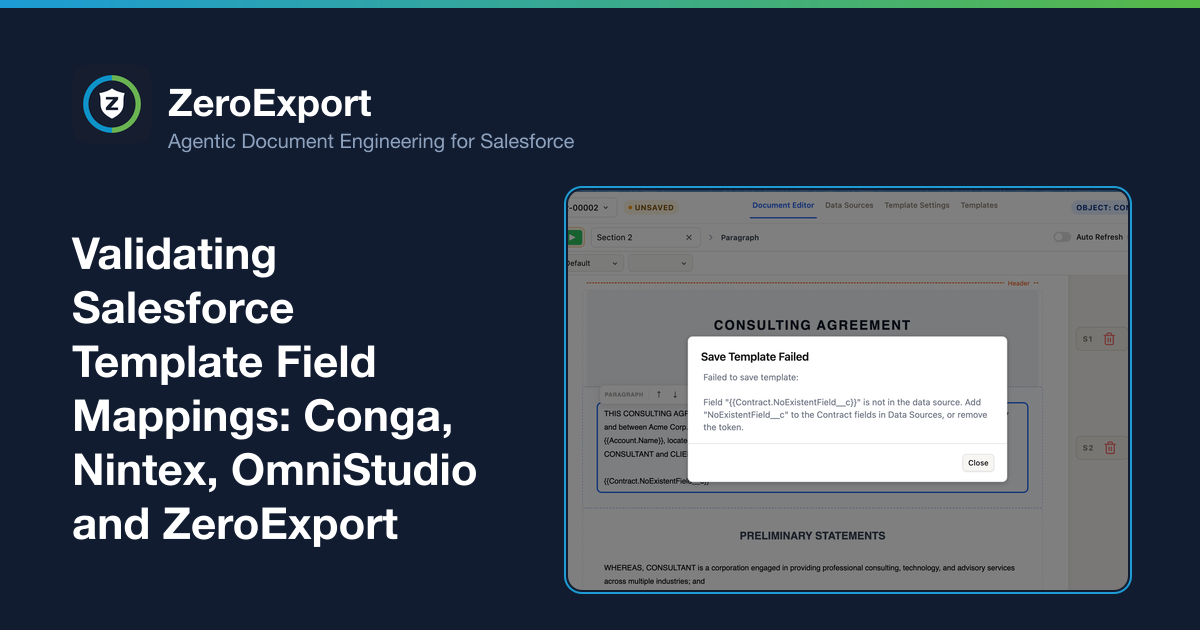
Most Salesforce document tools leave you to verify every merge field by hand, so a stale mapping prints blank in a sent document. How Conga Composer, Nintex DocGen and OmniStudio handle field mappings, and how ZeroExport validates them on every save.
A Salesforce template can look finished and still be wrong. Every merge field is a promise that some field, on some record, will be there at generation time. When the promise breaks, the document does not fail. It prints a blank, and the blank goes to a customer.
This post is about where that promise gets checked. In the tools most teams use today, the answer is "by a person, by hand, after the fact." ZeroExport 1.9.0 moves that check to the moment you save.
A note on scope. We build ZeroExport, so read this accordingly. Every claim about another product below is tied to that vendor's own documentation or to public discussion, and where the documentation we reviewed is silent, we say it is silent rather than claim the feature does not exist. Check the current docs for your edition before you decide.
How a field mapping goes stale
A mapping is correct on the day you build it. After that it drifts:
- A field is renamed, replaced, or removed from the object.
- A query or data source stops selecting a field the template still uses.
- A field's access changes, so a different user now generates the document without it.
- A template is copied for a new use case and keeps mappings that no longer apply.
None of these raise an error in the template. They show up later, in an output file, as an empty space where a price or a name should be.
What the other tools tell you about blank fields
The clearest evidence of how a product handles mappings is its own troubleshooting page. These are the pages the vendors publish for the case where a mapping did not resolve.
Conga Composer
Conga's own page for this case is titled Composer output contains blank fields. It is a checklist for the admin to work through after the output is already blank. Among the causes it lists:
- "The merge field name in the document template needs to exactly match the field name as it's listed in the Template Builder or View Data workbook."
- For traditional Word merge fields, "ensure that you are comparing the field name, not the field label."
- "If a user does not have access to a field in Salesforce, then that user will not be able to merge that field using Conga Composer." That depends on who runs the merge, so a template can work for you and print blanks for a colleague.
The page does not describe a check that runs when a template is saved or uploaded. The tools it points to, Template Builder and the View Data workbook, are where an admin looks up names and compares them by eye.
Nintex DocGen for Salesforce
Nintex describes how data connects to templates in terms of tags and aliases: entering an Alias "sets the tag prefix," and for runtime CSV or Excel data "the sheet name for the data that you want to import must match the value of this field." Matching is the author's responsibility.
That page does not describe what happens when a tag, sheet name or named range does not match, and it does not describe validation on save. The public record of what happens next is community threads, for example a row that shows the merge field tag instead of data, where the answer was to look for warning marks in Word and clear them. Troubleshooting runs through the Word file, one tag at a time.
Salesforce OmniStudio Document Generation
In OmniStudio, tokens in a .docx or .pptx template are mapped to data through a Data Mapper or a custom class. Salesforce's Trailhead module describes it this way: "A token is a placeholder in a template that maps input data for dynamic generation", and a mapping Data Mapper "extracts tokens from the .docx or .pptx template and matches them to fields in Salesforce." The module also describes Quick Match in the Data Mapper designer, which matches fields automatically to save time.
That is real help at setup. The module's validation advice is to generate a document and look at it: "check the document to make sure it's up to scratch." The module does not cover mismatched tokens. The community guidance is the same shape as the others: a Trailblazer thread explains that a token like {{Quote.QuoteNumber}} only resolves if the data has a root Quote node, and advises inspecting the Data JSON in the OmniScript debug panel.
The pattern
| Where a wrong mapping is found | By whom | |
|---|---|---|
| Conga Composer | After a blank appears, using a troubleshooting checklist and the View Data workbook | The admin |
| Nintex DocGen | After a tag fails to populate, in the Word file and community guidance | The admin |
| OmniStudio Document Generation | After generating a test document, or in the Data JSON debug panel | The admin |
| ZeroExport | When the template is saved or uploaded | The platform |
In all three, the documentation we reviewed puts verification on the person who built the template. It is the same chore in three different forms: generate, look, compare, fix. And because it depends on someone doing it, it tends to happen for the template being built today and not for the forty already in production.
What ZeroExport checks
Every time you save or upload a template, ZeroExport checks each {{Alias.Field}} token against the template's Data Sources. A token is rejected when:
Aliasis not one of the template's data sources, orFieldis not in that source's field list.
The reasoning is simple. Generation reads only the fields each data source queries. A token outside that list can never have a value, so it would print blank every time. Instead of letting it, the save fails with an error that names the token and the field to add in Data Sources.
A few details matter in practice:
- It runs on every save, not just creation. Remove a field from a data source, and the next save flags every token still using it. That is the stale-mapping case the other tools leave to a human.
- It allows what really resolves.
Idand the row numberindexare always allowed. A parent lookup's fields work through the primary source, such as{{Opportunity.Account.Name}}when the Account lookup selectsName. A lookup written as its field, like{{Contact.Manager__c.Name}}, matches the relationship the source queries. Matching ignores case. - It covers aggregates.
{{OpportunityLineItems.sum(TotalPrice) | 0}}must name a declared source and field, and a cross-level field such as{{Orders.sum(Lines.TotalPrice)}}must be declared on the nested source. - It rejects whole-record tokens. A token that names a data source with no field, such as
{{Contacts}}or{{Account}}, used to print raw rows, record Ids included. It is now rejected, and at generation such a token prints nothing, so older templates stop leaking raw records without being re-saved. - A template with no data source cannot use field tokens.
The full rules are in the Merge Field Syntax docs.
Brackets, system variables and escaping
A mapping can also be wrong because the token itself is malformed, and this is the other way blank or broken text gets into a document. The same save rejects, with the offending text quoted in the error:
- a
{{with no}}, or a}}with no{{ - a single
{with no closing}, such as a half-typed{toda - a single-brace name that is not a real system variable, such as
{todya}, with the valid names listed in the message - three braces in a row (
{{{Account.Name}}}), which would print only} - a
|format with nothing after it, or without a space on each side ({{Amount|currency}}prints nothing)
Validation would be in the way if you ever need to write merge syntax into a document, for a help page or a template guide. For that, escape each brace with a backslash: \{\{Account.Name\}\} prints {{Account.Name}}. Escaped braces are skipped by validation and never merged. See the escaping rules.
A real example from our own demo templates
When we added the check in 1.9.0, it found problems in our own demo templates, which had been printing blanks without anyone noticing:
- The Offer Letter used
{{Contact.Title}}without queryingTitle. - The Enterprise Quote used
{{User.Name}}, which no data source provides.
Both printed blank in 1.8.0. In 1.9.0 the Offer Letter queries Title and the Enterprise Quote uses the {user_name} system variable. For orgs that installed the demos earlier, both are rejected on their next save, with a message that says exactly what to change. If a vendor's own templates carried silent blanks, a library of hand-built templates almost certainly does too.
Validation is part of compiling the template
The check is not a separate lint step bolted onto the editor. When you save or upload a template, ZeroExport compiles it: merge tokens, repeats, visibility rules and aggregates are parsed once, at save time, instead of on every document. Validation is the part of that compile that rejects invalid tokens and structure errors, and compilation is all-or-nothing, so a template either compiles cleanly or the save is refused with the reason.
That is also why the check holds up on complex layouts. A grouped table with per-group subtotals, where a token like {{Orders.sum(Lines.TotalPrice)}} reaches into a nested source, is exactly where a hand-checked mapping goes stale first. The compile sees the whole structure, so it can confirm the nested field is declared on the nested source. Our post on complex table rendering shows the kind of table this protects.
Rolling it out across templates you already have
Upgrading changes no template, and templates saved before 1.9.0 keep generating the way they did. Validation runs when a template is saved, so an existing library is checked one template at a time:
- Open a template and save it once.
- If a token is stale, the save is rejected with an error that names the token and the field to add in Data Sources.
- Fix it, save again, and the template is now compiled and validated.
For a library of dozens of templates, that turns "audit every merge field by hand" into a save loop where the platform does the comparing. The same save also moves the template onto the compiled merge, which the docs measure at roughly 30–40% less Apex CPU for merging and rendering on templates with many rows.
Why this matters more once AI drafts your templates
A person who builds a template by hand usually knows which fields exist. An AI assistant drafting a template does not, unless it has been given the schema. It will happily write {{Opportunity.Discount_Reason__c}} because the name sounds right.
In a tool that verifies by generating a test document and looking at it, that token becomes a blank that someone has to notice. With save-time validation it is rejected immediately, with the token and the field to add, and the assistant can correct it in the same loop. The check does not care who wrote the token, which is what you want when authoring is getting faster and review time is not.
Why validate at save instead of at generation
Failing at generation sounds safe, but the cost depends on when the failure appears:
- At save, the person who knows the intent is still looking at the template. The fix is one step.
- At generation, a user on a record gets an error, or worse, a blank they do not notice. The person who can fix the template is not in the room.
- In output, the cost is a corrected document, a re-sent contract, or a customer who noticed first.
Silent failure is the expensive one, and it is the default behavior of mapping-by-convention. Our earlier post on hidden logic in Word document templates covers the wider version of the same problem, and Edge Cases & Limits lists every case where ZeroExport fails safe.
What this does not do
Validation is about structure, not data:
- It cannot know that a field is empty on a particular record. A valid mapping to a blank field still prints blank, by design, so optional fields keep the document clean.
- It does not check field-level security for the running user. That is Salesforce's own access model, and the Conga page above shows why it matters.
- It checks tokens against the template's own data sources, so a wrong data source definition is still the author's to get right.
- It runs when a template is saved, so a template nobody has re-saved since upgrading has not been through it yet.
What it removes is the largest avoidable category: a mapping that could never have worked, or one that stopped working after a change.
When another tool is fine
If you have a handful of simple, stable templates owned by one admin who tests every change, hand-verification is workable, and Conga, Nintex and OmniStudio are all mature in other areas. The case for automated validation grows with the number of templates, the number of people editing them, and how often the underlying objects change. Our comparisons with Conga Composer and Nintex DocGen cover where those products are the better fit.
FAQ
Does ZeroExport validate merge fields before a document is generated?
Yes. Saving or uploading a template checks every {{Alias.Field}} token against its Data Sources. A token for an unknown alias or an unqueried field is rejected with an error that names the token and the field to add.
Will this block templates I already have?
A template that already contains an invalid token is rejected on its next save until the field is added or the token removed. Upgrading changes nothing by itself, and templates are only checked when saved.
Does Conga Composer validate merge fields?
Conga's troubleshooting page for blank output is a manual checklist, and it does not describe a save-time validation step. See Composer output contains blank fields. Confirm against your edition's current documentation.
Does Nintex DocGen or OmniStudio validate template fields?
The documentation we reviewed for each (Nintex data connection, OmniStudio template tokens) describes matching and testing, not automatic validation of tokens on save. Check current docs for your version.
Do I have to re-save my existing templates?
Validation runs on save, so a template is checked the next time you save it. Templates saved before 1.9.0 keep generating the way they did until then. Opening and saving each one is how you find stale mappings in a library you already have. See Compiled Templates.
Does validation catch fields an AI assistant made up?
If a token names a data source or field that the template does not query, the save is rejected with the token and the field to add, whoever or whatever wrote it. It cannot tell you that a field exists but is the wrong one for the document, so a human still reads the result.
Does validation catch an empty field on one record?
No. It checks that a mapping can resolve, not that every record has a value. Empty values render as empty text.
Related Reading
- Merge Field Syntax
- Compiled Templates
- ZeroExport vs Conga Composer: A Head-to-Head Comparison
- ZeroExport vs Nintex DocGen (Drawloop): A Head-to-Head Comparison
- The Hidden Logic Problem in Word-Based Salesforce Documents
- Complex Table Rendering in Salesforce Documents: Nested Rows, Merged Cells and Subtotals
Ready to try ZeroExport?
Start generating documents directly in your Salesforce org. No integrations, no setup overhead, no complexity.