The Hidden Cost of Finding Out a Document Was Broken After You Sent It
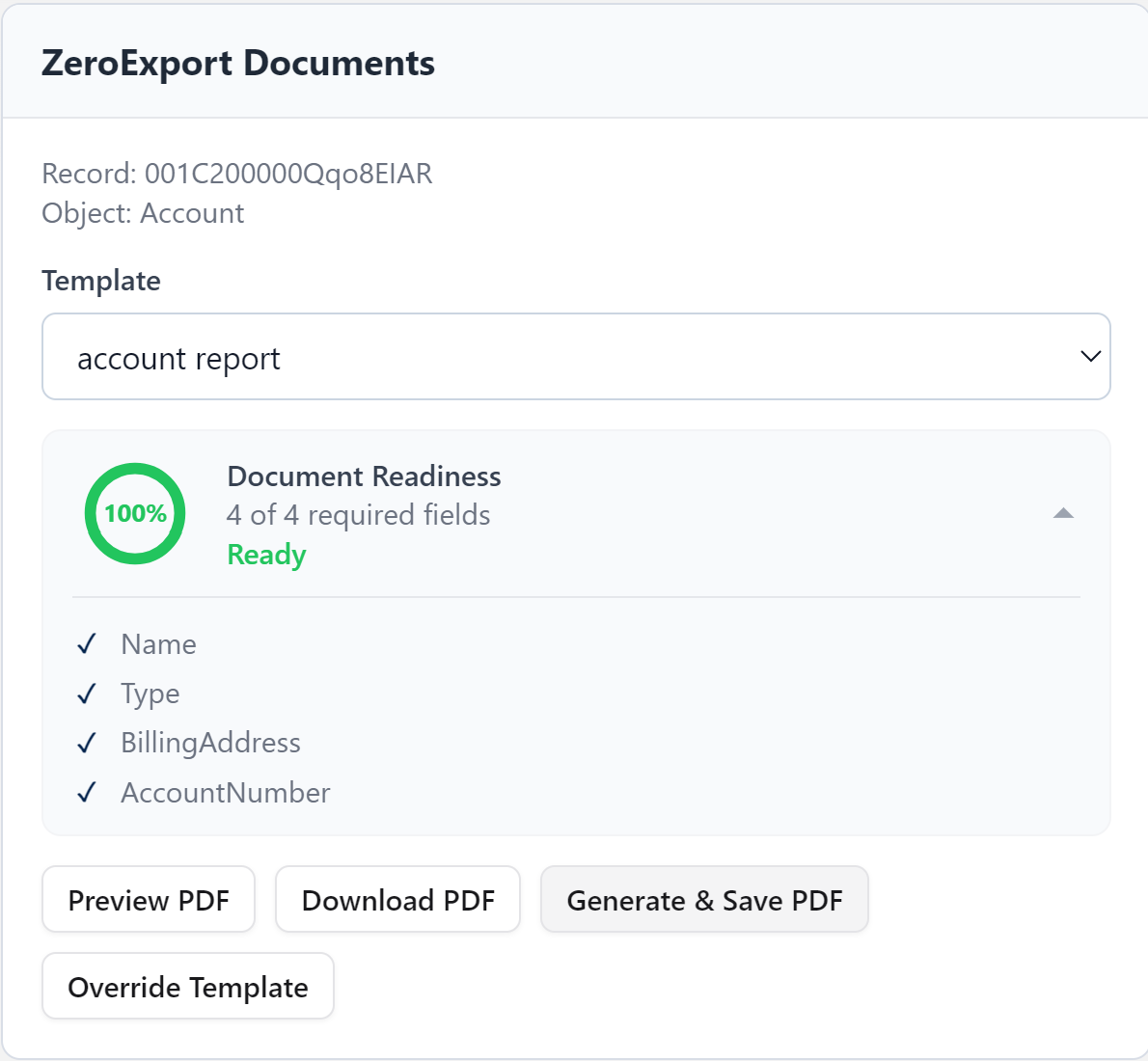
Most Salesforce document generation tools generate first and ask questions later. Document Readiness in ZeroExport surfaces missing required fields before anyone clicks Generate, directly on the record.
Most Salesforce document generation tools have the same blind spot: they don't know whether a record actually has what it takes to produce a complete document. They just generate. If a required field is empty, you find out the same way your customer does: by looking at the finished PDF.
For a single invoice template, that's an annoyance. For teams running portfolio statements, policy packs, or loan documents (where one missing field can mean a blank section in a document that's about to land in a regulator's or a client's inbox), it's a recurring liability.
This is a problem of document complexity, not document generation. And it's why we built Document Readiness into ZeroExport.
Why merge fields alone aren't enough
Traditional DocGen tools (Conga, Titan, OmniStudio, custom Apex) all share the same architecture: a template with merge tags, and an engine that fills them in at generation time. That engine doesn't ask "is this record ready?" It just runs. If a field is blank, the tag resolves to nothing, and the gap shows up wherever it lands: a blank box, a broken row, a section that doesn't make sense without the missing piece.
The usual fix is a validation rule: write logic that blocks save or flags a field before a document is ever requested. That works, but it's a second system bolted onto the first. Every required field means a new rule. Every rule needs testing: not just the happy path, but every edge case where a legitimate record might get incorrectly blocked. For a single template, that's a couple of hours of setup and testing. For an org running dozens of templates that change quarterly, that cost repeats every time a requirement changes.
Marking what a document actually needs
In ZeroExport, readiness is defined where the template itself is defined: in the Data Source Configuration panel, not in a separate rules engine.
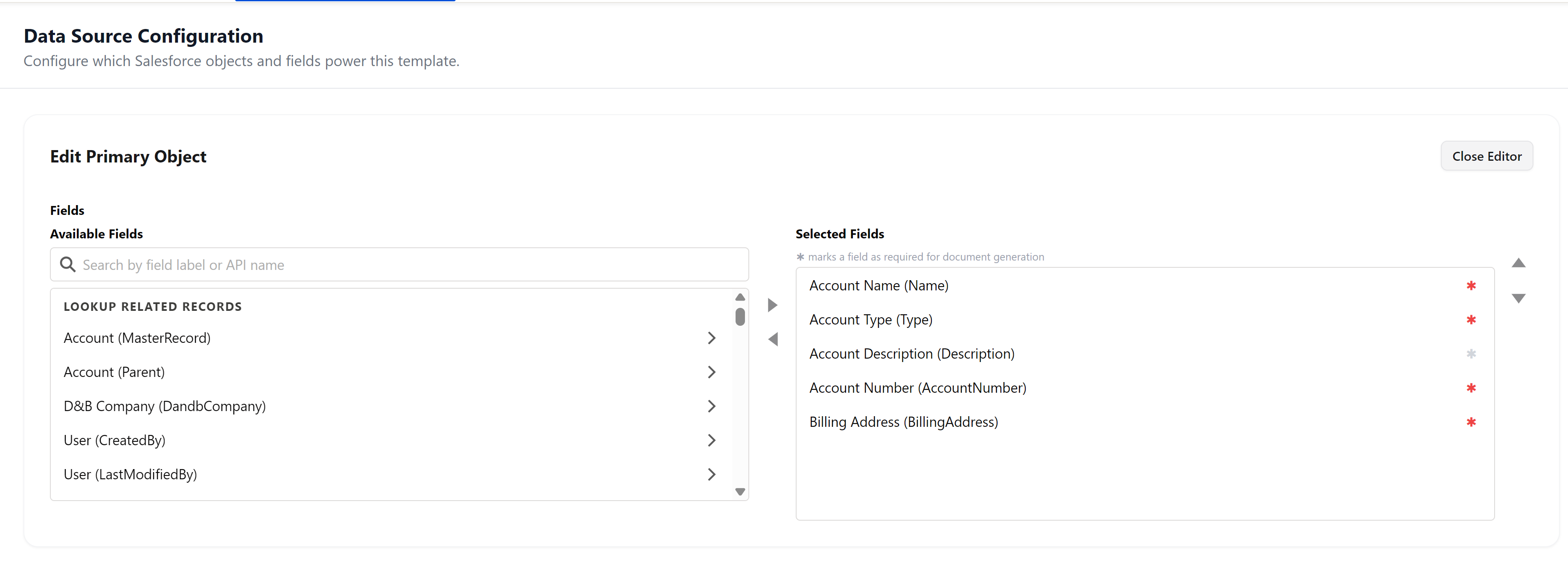
An admin selects the fields a template needs from the available Salesforce schema, then marks which of those are required for the document to generate: Account Name, Account Type, Account Number, and Billing Address, in this example. No Flow. No Apex. No second system to maintain alongside the template.
That's the structural difference: readiness isn't logic layered on top of the template. It's a property of the template.
What this looks like on the record
Once required fields are marked, every record using that template carries a live readiness status, visible before anyone tries to generate anything.
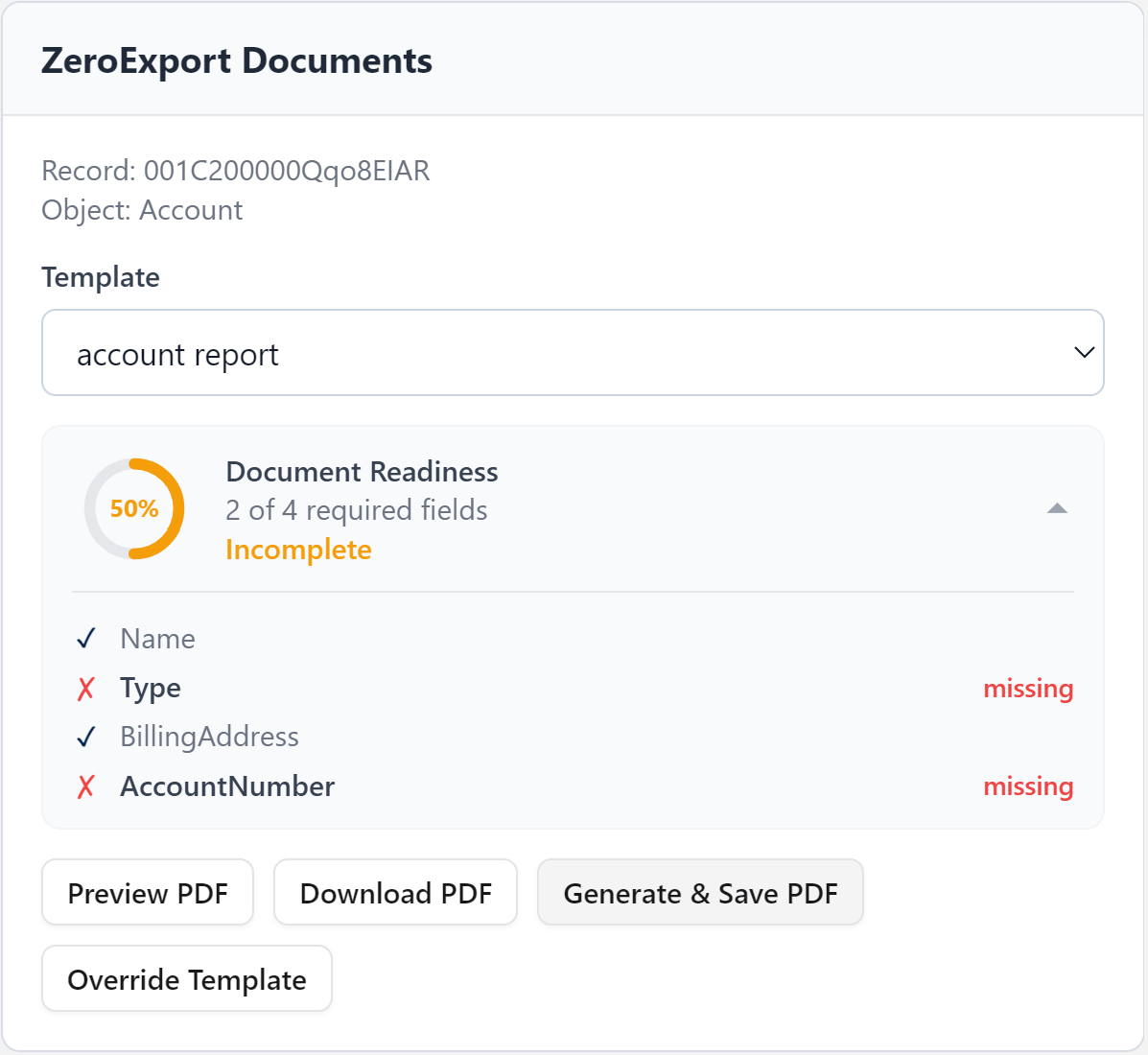
This account is missing two of its four required fields. The widget shows exactly which ones (Type, Account Number) flagged directly on the record. Nobody has to generate a PDF and inspect it to find the gap.
Once those fields are filled in, the same widget updates to 100% and Ready, and the Generate & Save PDF action becomes available. The status moves with the data: there's no separate sync step, no re-running a rule.
The lesson here
Readiness checking is a small example of a larger pattern in how ZeroExport is built: instead of adding a rule engine next to the document engine, the document engine understands enough about the template's structure to answer the question itself. The same principle shows up in how ZeroExport handles missing data in layouts, nested repeaters, and cascading section visibility: the system reasons about structure, not just placement.
For teams maintaining a handful of simple templates updated once or twice a year, a validation rule is a perfectly reasonable answer to this problem. ZeroExport is built for the teams where that stops being true: where the number of required-field combinations, template variants, and edge cases has outgrown what a rule-by-rule approach can keep up with.
If you're currently maintaining validation rules just to catch missing data before a document goes out, it's worth asking how many of them exist purely for that reason, and what happens to that number as the next compliance change, product line, or new template gets added.
Frequently Asked Questions
What is Document Readiness in Salesforce document generation? Document Readiness is a pre-generation check that evaluates whether a Salesforce record has all the fields required by a document template before any PDF is produced. Instead of discovering missing data in the finished output, users see a live readiness status, with specific missing fields identified, directly on the record page.
How is Document Readiness different from Salesforce validation rules? Validation rules are enforced at save time and are maintained separately from document templates. Every new required field means a new rule, and rules must be tested and updated whenever template requirements change. Document Readiness in ZeroExport ties the requirement to the template itself: when the template changes, the readiness check changes with it, with no additional rules to write or maintain.
Does Document Readiness work across multiple templates on the same record? Yes. Each template carries its own set of required fields. A record can show different readiness statuses for different templates: for example, ready for a one-page summary but incomplete for a full compliance pack that needs additional fields. Each status is evaluated and displayed independently.
How does ZeroExport handle Field-Level Security (FLS) and missing fields? ZeroExport respects Salesforce Field-Level Security at every point in the readiness check. If the running user does not have read access to a field that a template marks as required, that field is treated as inaccessible, not merely empty, and the readiness widget flags it accordingly. This means a field that is blank because of FLS restriction is surfaced as a distinct issue from a field that is simply unfilled, so admins know whether the gap is a data problem or a permissions problem. Generation is blocked until both are resolved.
Can Document Readiness be shown on a Lightning record page? Yes. The Document Readiness widget is a Lightning Web Component that can be placed on any record page via the Lightning App Builder. It evaluates the record's data in real time and updates as fields are filled in: no page refresh required.
Does a record have to be 100% ready before a document can be generated? By default, generation is gated on 100% readiness for templates that have required fields marked. This prevents incomplete documents from being produced and saved. Admins can choose not to mark any fields as required for templates where partial output is acceptable, in which case readiness checking is effectively bypassed for that template.
What happens if a required field is added to a template after documents have already been generated? Existing generated documents are not affected. From the point the template is updated, any record using that template will reflect the new required field in its readiness status. Records that were previously at 100% may drop below, which is intentional: the readiness score reflects the current template, not the state at the time of the last generation.
Ready to try ZeroExport?
Start generating documents directly in your Salesforce org. No integrations, no setup overhead, no complexity.