Agentforce Document Generation: Generate Salesforce PDFs Instantly with ZeroExport
Use Agentforce to generate Salesforce PDF documents on demand: invoices, quotes, opportunity summaries, just by typing a prompt. ZeroExport handles the rest natively inside your org.
Imagine your sales rep finishing a call with a client and immediately saying:
"Generate invoice PDF for Acme Inc from the latest opportunity."
No navigating to records. No searching for the right template. No waiting. The document is ready in seconds.
That's exactly what Agentforce document generation with ZeroExport makes possible: a native Salesforce integration that lets your team generate any PDF document using a plain-language Agentforce prompt.
What is Agentforce?
Agentforce is Salesforce's autonomous AI agent platform that lets users interact with their CRM through natural language. Instead of clicking through menus and forms, users type what they need and the Agentforce agent handles the rest: querying records, running actions, and returning results conversationally.
If you want an official product overview, Salesforce provides a good starting point on Agentforce AI Agents.
Agentforce agents are configured using Topics (which define when the agent should act) and Agentforce Actions (which define what the agent does). ZeroExport plugs into this system as a pre-built Agentforce Action for document generation.
When you pair Agentforce's conversational interface with ZeroExport's native document generation engine, the result is a seamless experience that saves your team significant time every single day.
How Agentforce Document Generation Works
ZeroExport's Agentforce Action follows a clear, deterministic four-step workflow:
1. Understand the Agentforce Prompt & Find the Records
The Agentforce agent interprets the user's natural language prompt and identifies the relevant Salesforce records. Whether the user mentions an account name, a date range, or simply says "my latest 5 opportunities", the agent resolves that to real record IDs using Salesforce data.
2. Find the Right Template
ZeroExport looks up the document template mapped to the object type in the request. Templates are already configured in your org, so the agent always knows exactly which template to use for an invoice, a summary, a quote, or any custom document type.
3. Generate the Documents
ZeroExport generates the PDF (or other format) entirely within your Salesforce org: no external servers, no data leaving your environment. Each record gets its own document. When a prompt covers several records, they are generated one after another rather than as a single bulk job.
4. Return the Document Links
The agent responds with direct links to every generated document. The user can open, download, or share them immediately: straight from the conversation.
Agentforce Document Generation Prompts: Real Examples
Here are real examples of what your team can say to the Agentforce agent to trigger document generation:
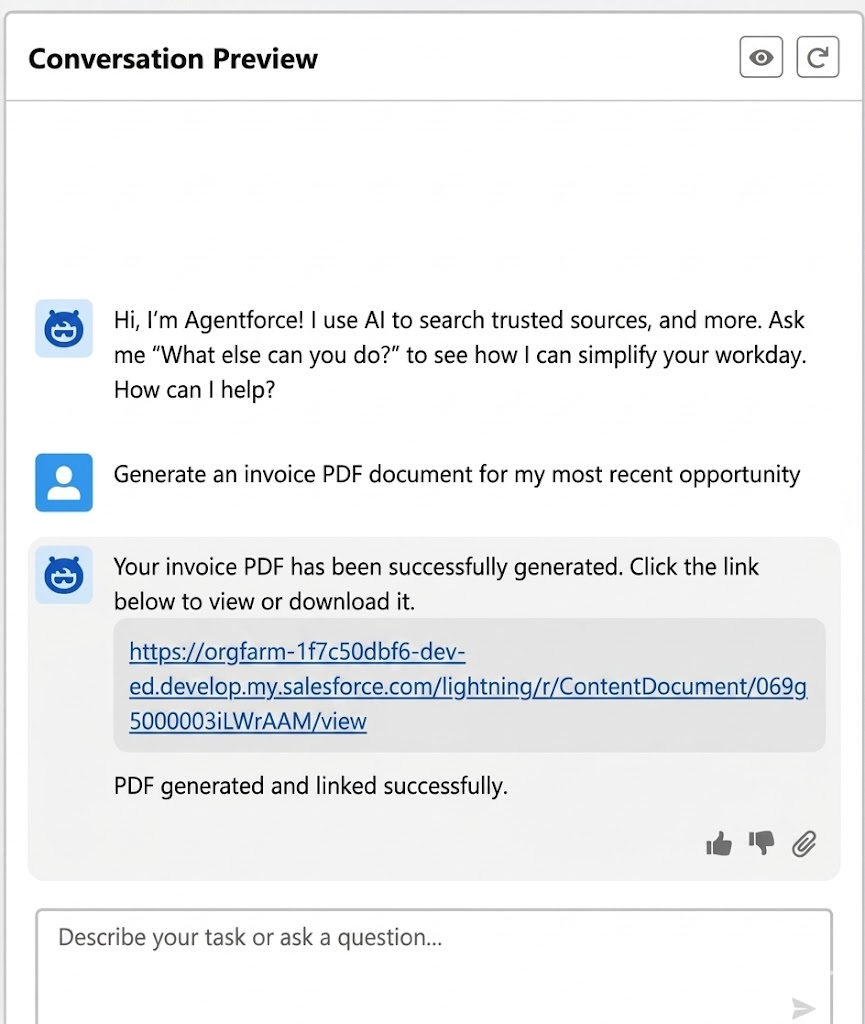
Generate an Invoice for a Specific Account
Prompt: "Generate invoice PDF for Acme Inc from latest opportunity."
The agent finds the most recent opportunity associated with the Acme Inc account, applies the Invoice template, generates the PDF, and returns the document link all in one step.
Generate Summaries for Several Opportunities
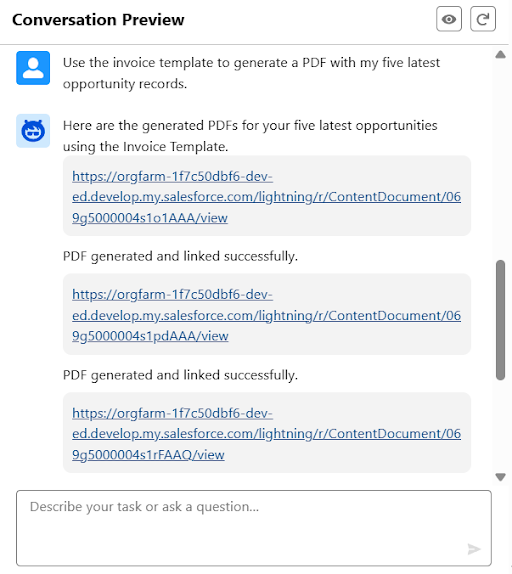
Prompt: "Generate opportunity summary PDF document for my latest 5 opportunities."
The agent identifies the 5 most recently modified opportunities owned by the current user, generates a summary document for each one using the Opportunity Summary template, and returns all 5 links in a single reply.
Other Prompts You Can Use
Once the integration is set up, your team can use prompts like these out of the box:
| Prompt Example | What Happens |
|---|---|
| "Generate a quote PDF for the Johnson & Johnson deal." | Finds the matching opportunity, applies the Quote template, returns the link |
| "Create a contract document for all open deals closing this month." | Finds all opportunities closing in the current month, generates contract PDFs for each |
| "Generate account summary for Salesforce Inc." | Finds the account record, applies the Account Summary template, returns the PDF |
| "Create proposal documents for my top 3 opportunities by amount." | Finds opportunities sorted by amount, generates proposals, returns links |
Why This Matters for Your Team
No Context Switching
Your reps stay in one place. There is no navigating to records, no looking up templates, no manual triggering of flows. The entire document generation workflow lives inside the conversation.
Works Across All Objects
Because ZeroExport supports templates for any Salesforce object (standard or custom), Agentforce can generate documents for opportunities, accounts, cases, quotes, custom objects, or anything else in your org.
Several Records From One Prompt
Asking for one document and asking for five takes the same effort from the user: one prompt, and the links come back together. Under the hood the records are processed one after another, and heavier documents are routed to an asynchronous job to stay within platform governor limits — for those, the immediate response confirms the work is queued and the link follows when the job completes.
To be precise about what this is: it is sequential generation driven by a prompt, not bulk generation. It suits a handful of records at a time, which is what a conversational request usually covers. It is not the mechanism for running a template across hundreds of records — dedicated bulk generation is on the roadmap and is not shipped today.
Data Never Leaves Salesforce
ZeroExport operates 100% natively inside your Salesforce org. Every step of this workflow: record lookup, template retrieval, document generation, link delivery, happens within your security boundary. No third-party servers, no data exports.
Setting Up Agentforce Document Generation with ZeroExport
The ZeroExport Agentforce Action is available as a pre-built action that you add directly in Agentforce Agent Builder. The setup involves:
- Install ZeroExport in your Salesforce org (if not already installed)
- Configure your document templates for the objects you want to support
- Open Agentforce Agent Builder and add the ZeroExport Generate Document action
- Create or update an Agentforce Topic: define the context so the agent knows when to trigger document generation (e.g., any prompt mentioning "generate PDF", "create document", or a specific document type)
If your team is new to setup, Salesforce's Agent Builder page is useful for understanding how agents, topics, and actions fit together.
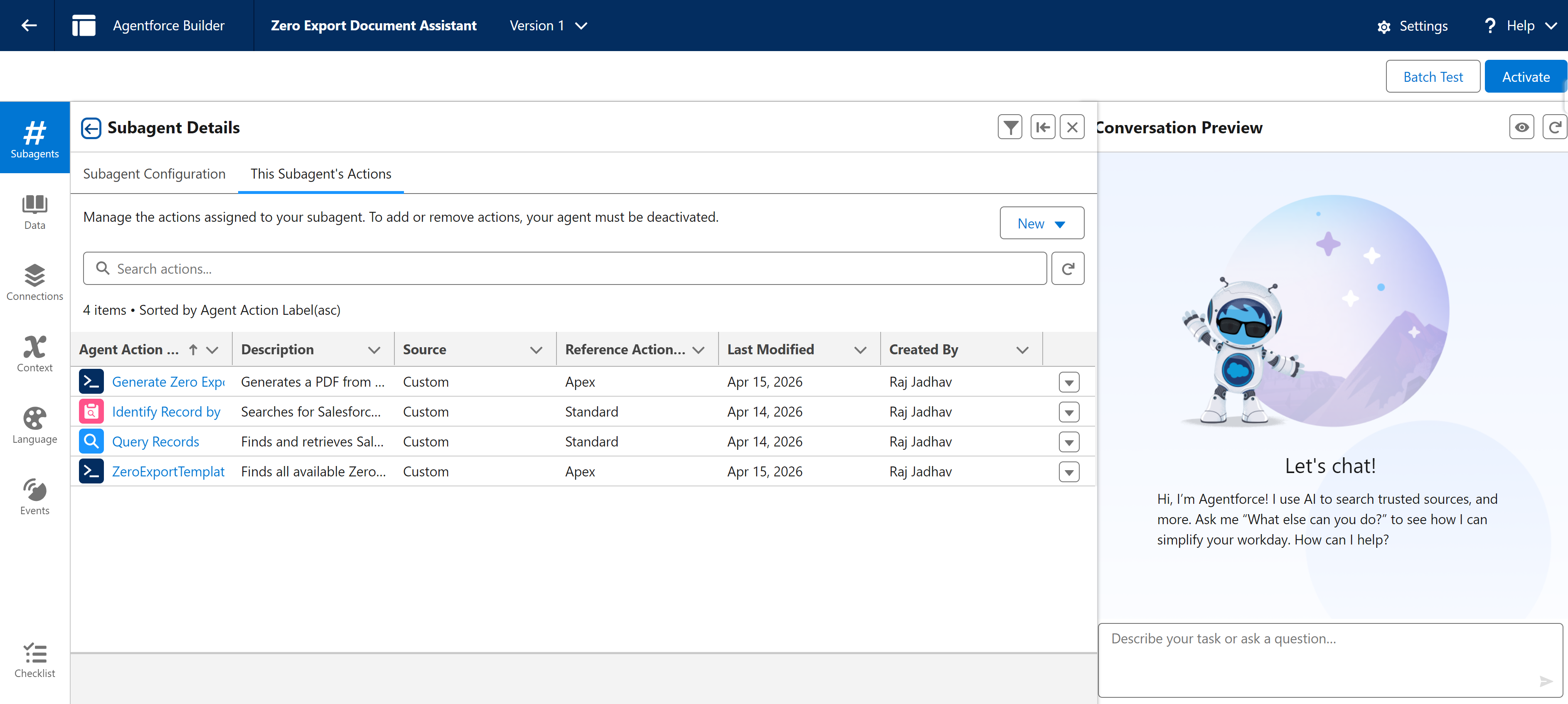
No custom Apex, no complex flow configuration. The Agentforce Action ships ready to use.
What Gets Returned
After the agent processes a document generation request, the user sees a response like this directly in the Agentforce chat:
Agent: I've generated the following documents for you:
- Acme Inc Invoice Q2 2026 → View Document
The document has been saved to the related Opportunity record and is ready to share.
For a prompt covering several records:
Agent: Here are the 5 opportunity summary documents:
- Global Tech Q2 Expansion → View Document
- Meridian Solutions Renewal → View Document
- Acme Inc New Business → View Document
- NorthPoint Group Upsell → View Document
- CloudBridge Inc Enterprise Deal → View Document
Agentforce + ZeroExport: The Bigger Picture
Document generation has traditionally been a manual, repetitive task that interrupts the flow of work. Sales reps navigate to a record, find the right button or flow, select a template, wait for generation, then locate the output.
With Agentforce document generation powered by ZeroExport, that entire process collapses into a single sentence.
Your team asks for what they need. The Agentforce agent delivers. Everyone moves faster.
This is what Agentforce is designed for removing the repetitive, navigational work from your team's day so they can focus on what matters.
Frequently Asked Questions About Agentforce Document Generation
What is Agentforce document generation?
Agentforce document generation is the ability to generate Salesforce PDF documents (invoices, quotes, contracts, summaries) by typing a natural language prompt into an Agentforce AI agent, without manually navigating to records or selecting templates.
Can Agentforce generate PDF documents natively in Salesforce?
Yes, when paired with ZeroExport. ZeroExport provides a pre-built Agentforce Action that connects the Agentforce agent to your document templates and generates PDFs entirely within your Salesforce org: no external servers involved.
What is an Agentforce Action?
An Agentforce Action is a discrete capability that an Agentforce agent can invoke in response to a user prompt. The ZeroExport Generate Document action is one such action it handles record lookup, template matching, and PDF generation as a single callable step for the agent.
What is an Agentforce Topic?
An Agentforce Topic defines the context in which an agent should activate certain actions. For document generation, you configure a Topic that tells the agent to invoke the ZeroExport action whenever a user asks to generate, create, or export a document.
Does Agentforce document generation work for custom objects?
Yes. Because ZeroExport supports templates for any Salesforce object (standard or custom), the Agentforce Action can generate documents for any object in your org.
Can Agentforce generate documents for several records at once?
Yes, within reason. A prompt like "generate summary documents for my top 10 opportunities" covers all 10, and the links come back together. The records are processed one after another rather than as a bulk job: simple documents return their links directly in the response, while more complex ones are routed to an asynchronous job to stay inside governor limits, so their links become available when those jobs finish. This is well suited to the handful of records a conversational request usually covers, and it is not a substitute for bulk generation across hundreds of records, which is on the roadmap rather than shipped.
Get Started with Agentforce Document Generation
Related reading:
- Live Document Editing in Salesforce: No Admin Required
- Why Native Salesforce Document Generation Matters for Compliance
ZeroExport's Agentforce integration is available now. If you're already using ZeroExport, reach out to learn how to enable the Agentforce Action in your agent configuration.
If you're new to ZeroExport, join the waitlist to see Agentforce document generation in action with a live demo.
You can also explore related ecosystem options on AppExchange, including document generation agent listings.
Ready to try ZeroExport?
Start generating documents directly in your Salesforce org. No integrations, no setup overhead, no complexity.