Building a Multi-Section Compliance Report in Salesforce
See how a regulatory compliance report is assembled from Salesforce data, with variable sections per regulatory domain, conditional disclosures, and audit-ready output.
Compliance reports are the most unforgiving documents in a regulated business. They must include the right sections, in the right order, with the right disclosures for the specific entity, jurisdiction, and regulatory framework involved.
Miss a section and the report is incomplete. Include a section that does not apply and you create confusion during audit. Get the formatting wrong and reviewers question the quality of the underlying data.
This article walks through a compliance report built in Salesforce using ZeroExport, showing the document structure, the data that drives each section, and the decisions behind the template.
The Document
This showcase covers an internal compliance review report for a financial services firm. The report is generated quarterly per business unit and submitted to the compliance committee.
Each report covers:
- Executive summary
- Regulatory obligations applicable to the business unit
- Controls monitoring results
- Exceptions and findings (if any)
- Remediation actions (conditional; only if findings exist)
- Attestation and sign-off
The total page count varies from 8 pages (clean quarter, no findings) to 34 pages (multiple findings with remediation tracking).
Salesforce Data Structure
Business_Unit__c (primary object)
  ├── Compliance_Officer__c (User lookup)
  ├── Regulatory_Framework__c (multi-select picklist: GDPR / SOX / FINRA / PCI-DSS)
  ├── Obligation__c (child: regulatory obligations applicable to this BU)
  │     └── Regulation__c, Obligation_Text__c, Frequency__c, Owner__c
  ├── Control_Test__c (child: controls monitoring results)
  │     └── Control_Name__c, Test_Date__c, Result__c (Pass/Fail), Evidence_Ref__c
  └── Finding__c (child: exceptions and findings)
        └── Finding_ID__c, Description__c, Severity__c, Root_Cause__c
              └── Remediation__c (child of Finding: one or more remediation actions)
                    └── Action__c, Owner__c, Due_Date__c, Status__c
Section 1: Executive Summary
The executive summary fits on one page. It provides:
- Business unit name and reporting period
- Compliance officer name
- Applicable regulatory frameworks (rendered from the multi-select picklist)
- Total obligations reviewed this quarter
- Controls tested: X passed, Y failed
- Findings: count by severity (Critical / High / Medium / Low)
- Overall compliance status (a formula field on the Business Unit)
All figures are live Salesforce data. When a new control test result is entered in Salesforce, the next report generation reflects it automatically.
Template decision:
The regulatory frameworks field is a multi-select picklist. Each selected value renders as a badge or bullet, not as a comma-separated string. This required binding to a split rendering of the picklist values rather than the raw field value.
Section 2: Regulatory Obligations
The obligations section lists all regulatory requirements applicable to the business unit for this quarter.
The section is a repeating table bound to the Obligation child data source, grouped by regulation:
SOX Obligations
| Obligation | Frequency | Owner | Status |
|---|---|---|---|
| Internal controls documentation | Quarterly | Finance Controller | Completed |
| Management assessment of controls | Annual | CFO | In Progress |
| External auditor coordination | Annual | CFO | Completed |
FINRA Obligations
| Obligation | Frequency | Owner | Status |
|---|---|---|---|
| Trade surveillance review | Monthly | Compliance Officer | Completed |
| Customer complaint log review | Quarterly | COO | Completed |
If a regulatory framework has no obligations this quarter, that section is absent. A business unit with only SOX obligations will not have a FINRA section.
Section 3: Controls Monitoring Results
The controls section shows the results of control tests conducted during the quarter.
Controls are grouped by category (Financial Controls, IT Controls, Operational Controls):
| Control | Test Date | Result | Evidence Reference |
|---|---|---|---|
| SOX 302 Certification | 2026-04-15 | Pass | SOX-302-Q1-2026 |
| Access Control Review | 2026-04-20 | Pass | IT-ACR-Q1-2026 |
| Trade Reconciliation | 2026-04-18 | Fail | TRD-REC-Q1-2026 |
Failed controls are highlighted with conditional formatting (red text or background). This uses ZeroExport's row-level conditional style: if Control_Test__c.Result__c equals Fail, apply the failure style to that row.
Template decision:
Row-level conditional formatting is configured on the table body rows. The condition Result__c = 'Fail' applies a different text color class to the entire row. No custom code required.
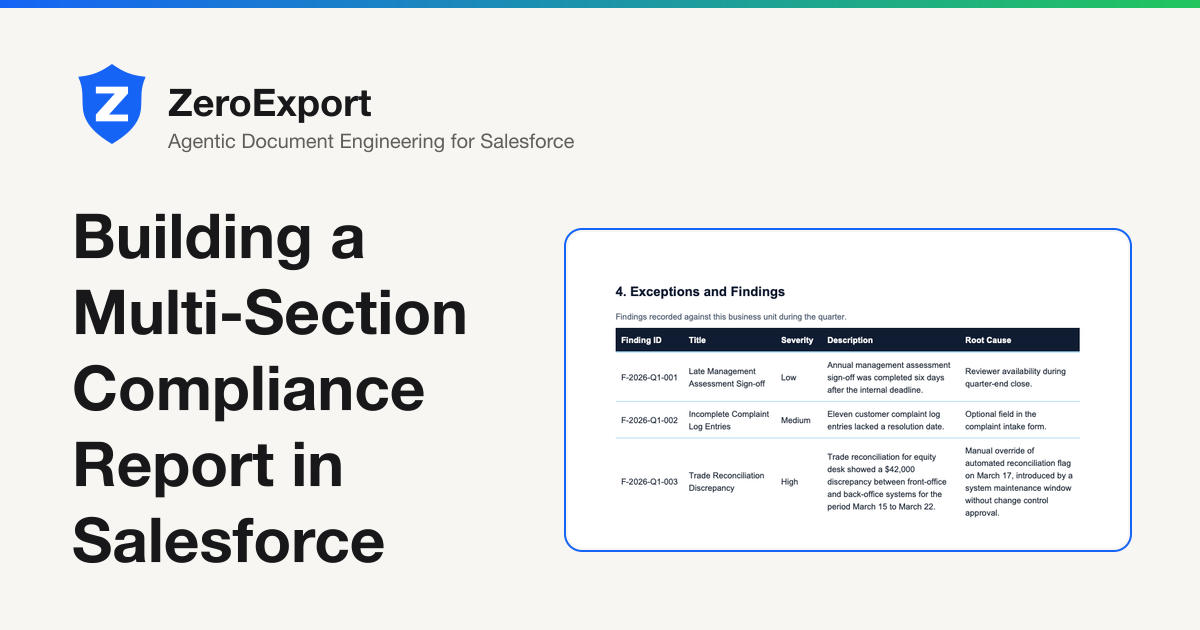
Section 4: Exceptions and Findings
The findings section appears only if the business unit has at least one Finding record this quarter.
Condition: Finding__c record count > 0
If no findings exist, this section is absent. The document jumps directly to the attestation section, producing a shorter, cleaner output for clean quarters.
When findings exist, each finding is a subsection:
Finding F-2026-Q1-003: Trade Reconciliation Discrepancy
- Severity: High
- Description: Trade reconciliation for equity desk showed a $42,000 discrepancy between front-office and back-office systems for the period March 15–March 22.
- Root Cause: Manual override of automated reconciliation flag on March 17. Introduced by system maintenance window without change control approval.
Section 5: Remediation Actions (Conditional)
The remediation section renders only if findings exist, and within it, each finding's remediation actions repeat.
This is a two-level conditional:
- The Remediation section renders if
Finding__ccount > 0 - Inside, each finding repeats with its own remediation action table
Finding F-2026-Q1-003, Remediation Actions
| Action | Owner | Due Date | Status |
|---|---|---|---|
| Implement mandatory change control approval for reconciliation overrides | Head of Operations | 2026-05-15 | In Progress |
| Retrain equity desk on reconciliation override procedures | Compliance Officer | 2026-04-30 | Completed |
| Review all March overrides for similar discrepancies | Internal Audit | 2026-05-30 | Not Started |
For a clean quarter, this entire section is absent. The document reflects reality: no findings means no remediation section to explain.
Section 6: Attestation and Sign-Off
The final section is always present. It contains:
- Standard attestation statement (static legal text)
- Compliance officer signature line
- Business unit head signature line
- Date of submission
- Submission reference number
The attestation page is fixed-height; it always fills exactly one page. The compliance officer and business unit head names come from Salesforce User lookups.
What the Clean vs Findings Report Looks Like
Clean Quarter (no findings):
| Section | Present |
|---|---|
| Executive Summary | Yes |
| Regulatory Obligations | Yes |
| Controls Monitoring | Yes |
| Exceptions and Findings | No |
| Remediation Actions | No |
| Attestation | Yes |
Total: 8 pages
Quarter With Findings:
| Section | Present |
|---|---|
| Executive Summary | Yes |
| Regulatory Obligations | Yes |
| Controls Monitoring | Yes |
| Exceptions and Findings | Yes (4 findings) |
| Remediation Actions | Yes (12 actions) |
| Attestation | Yes |
Total: 34 pages
The same template. Conditional structure produces the appropriate document for each scenario.
FAQ
Can this template support multiple business units in one report?
Yes, by making the Business Unit section a repeating section at the document root. Each business unit would have its own obligations, controls, and findings subsections.
Can the compliance officer change the regulatory frameworks mid-year and have the report update automatically?
Yes. The regulatory framework field on the Business Unit drives which obligation and control sections appear. When the framework changes, the next report generation reflects the new scope.
How are failed controls tracked between quarters?
Failed controls that have not been resolved appear again in the next quarter's report because the Control_Test__c record still shows Fail. When retested and passed, the result updates in Salesforce and the next report shows the corrected status.
Can findings be linked to specific obligations?
Yes, if you add a lookup from Finding to Obligation. The template can then show findings directly under their related obligation in Section 2, rather than as a separate section.
Related Reading
Ready to try ZeroExport?
Start generating documents directly in your Salesforce org. No integrations, no setup overhead, no complexity.