Live Document Editing in Salesforce: No Admin Required
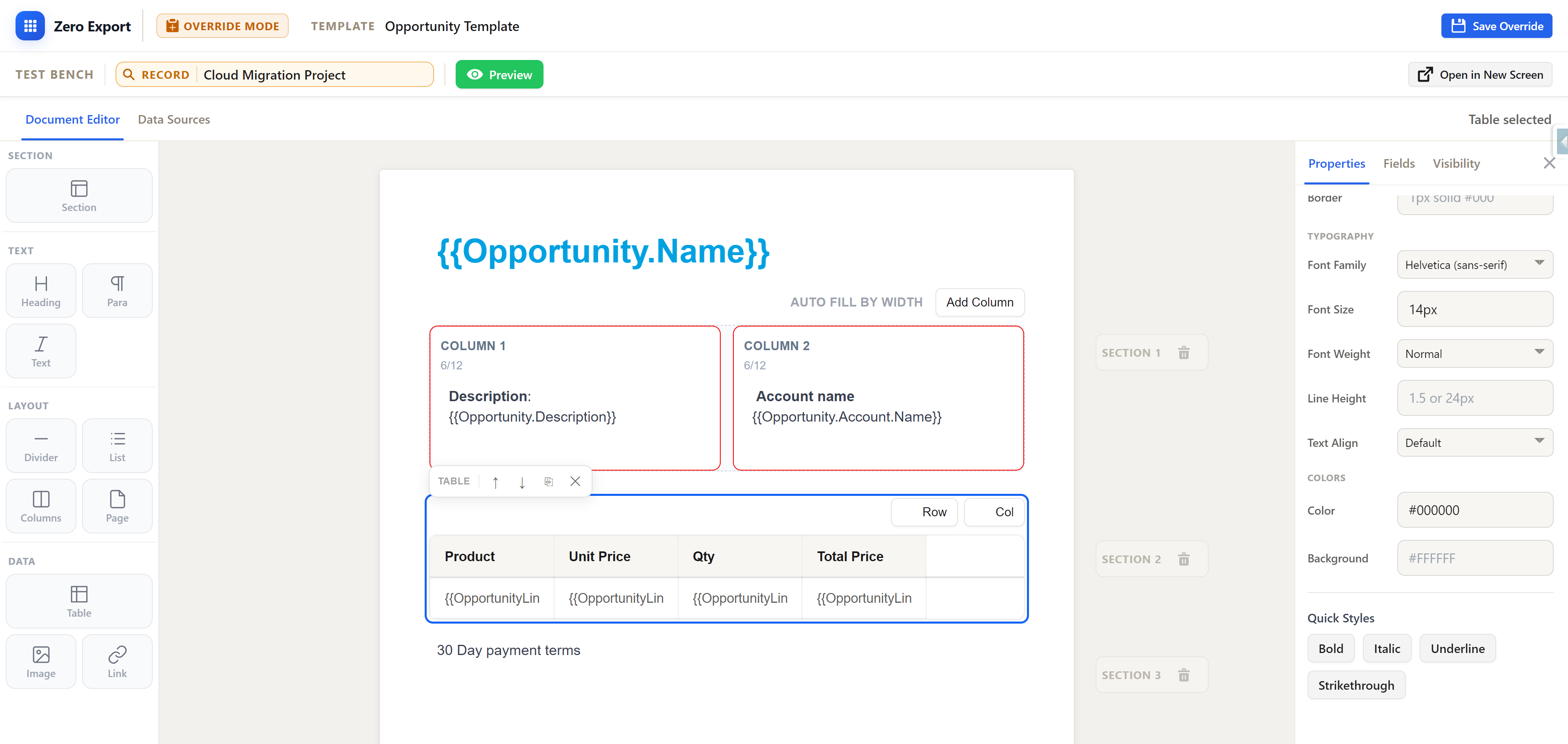
Learn how to make one-off changes to Salesforce documents without waiting for an admin. ZeroExport's Override Mode lets you edit documents for specific records while maintaining governance.
You've been there. A high-value contract is ready to go, but the client needs one small, specific clause added. Or an invoice needs a custom note for a particular customer. The template is 99% perfect, but that last 1% requires a change.
Traditionally, this means one thing: a request to your Salesforce Admin, a wait in the queue, and a delay in sending your document.
What if you could make that change yourself, right on the record, without ever touching the master template?
The "Just One Small Change" Problem
Document templates are designed for standardization. But business is rarely standard. One-off changes, special terms, and custom notes are a daily reality. When your document generation tool requires every modification to go through an admin, you create a bottleneck that slows down sales, finance, and operations.
Business users are left waiting, and admins are pulled away from strategic projects to handle minor text edits. It's an inefficient process for everyone.
Override Mode: Your Personal Edit Button
This is why we built Override Mode in ZeroExport. It's a simple concept with a powerful impact: it allows authorized users to make live edits to a document for a single record without altering the underlying template.
Think of it as a temporary, record-specific version of the template. You get the one-off change you need, and the master template remains untouched for everyone else.
How It Works: A 3-Step Process
- Open the Record: Navigate to any Salesforce record (e.g., an Opportunity, Account, or custom object).
- Click Override: In the ZeroExport component, instead of "Generate & Save", you select "Override Template". This opens the document in the live editor.
- Edit & Save: Make your changes directly in the editor. The document is now a unique version tied only to that specific record.
The next time someone generates the document for that record, they'll get the custom-edited version. Everyone else using the template will get the standard master version.
Governance with Locked Sections and Audit Trails
"But wait," you might ask, "doesn't this create a free-for-all? Can users change anything they want?"
No. Governance is built-in, and it goes beyond just locking content.
1. Locked & Editable Sections
Admins retain full control over what can be edited. Within the template builder, an admin can define sections as locked or editable.
- Locked Sections: Legal clauses, company information, pricing tables, and other critical content cannot be altered by business users in Override Mode.
- Editable Sections: Areas like "Notes," "Special Terms," or introduction paragraphs can be marked as editable, giving users the flexibility they need within safe boundaries.
2. Full Audit Trail
Crucially, every change made in Override Mode is tracked. Because ZeroExport is native to Salesforce, all actions are logged directly on the platform. You have a clear, reportable answer to:
- Who made the change?
- What was changed?
- When was it changed?
This is a significant advantage over legacy, Word-based document generation tools, where tracking one-off edits is often impossible. With a native solution, the audit trail is part of the package, ensuring you never lose visibility into how your documents are being modified.
This model provides the best of both worlds: business users are empowered to handle their own one-off needs, and admins ensure that compliance and standardization are always enforced.
Speed, Empowerment, and Control
The "just one small change" request no longer needs to be a roadblock. With a live editing feature like Override Mode, you empower your teams to move faster, reduce administrative overhead, and maintain strict governance over your document workflows. It’s about giving users the flexibility they need to do their jobs, without compromising the integrity of your templates.
For teams that run high-volume support operations, this pattern is especially useful alongside service cloud workflows where speed and consistency both matter.
Related reading:
- Why Native Salesforce Document Generation Matters for Compliance
- Agentforce Document Generation: Generate Salesforce PDFs Instantly with ZeroExport
Frequently Asked Questions (FAQ)
But wait, can't I just download a Word/PDF from a legacy tool and edit it?
You can, but that approach comes with significant drawbacks that Override Mode solves:
- No Governance: Once a file is downloaded, you have zero visibility into what was changed, where, or by whom. This is a major compliance and version control risk. With Override Mode, every edit is tracked in a Salesforce audit trail.
- Local File Mess: Downloading files creates a disorganized "download folder" problem on local machines. This makes it hard to find the latest version and creates data security risks, as sensitive information now lives outside of Salesforce.
- Manual Re-upload: After editing, the user has to manually upload the new version back to the correct Salesforce record, creating extra steps and room for error.
Does using Override Mode change the master template?
No. The master template remains completely untouched. An override is a record-specific version that only applies to the single record you edited it for.
Who can use Override Mode?
Any user with the correct permissions can use Override Mode. However, Salesforce Admins have the final say on what can be edited by marking specific template sections as "locked" or "editable," ensuring that critical legal or branding content always stays consistent.
Can we report on the changes made in overrides?
Yes. Because all override actions are logged as native data within Salesforce, you can build reports and dashboards to track all modifications. This gives you a complete audit trail of how and when documents are being customized.
How many overrides can be created for a single Salesforce record?
Only one. Each record can have a single override version. This ensures there is always one source of truth for any customized document, preventing confusion from multiple different versions.
What happens if two people try to edit an override at the same time?
The system prevents conflicting changes. If User A is editing and saves their changes, User B will be notified that the template has been updated and will be restricted from overwriting User A's work. This ensures that edits are not lost.
Why not just use Word-based templates for editing?
Word-based templates are often brittle and inconsistent. Because they are flow-based, a simple paragraph edit can reflow the entire document and break complex formatting. Our editor is block-based and logic-driven, meaning edits are contained and don't unexpectedly alter the rest of your document, ensuring consistency every time.
Ready to try ZeroExport?
Start generating documents directly in your Salesforce org. No integrations, no setup overhead, no complexity.