One Prompt, Full BOM: Claude Builds a Bill of Materials Template in Salesforce
Watch Claude use the ZeroExport MCP server to build a multi-section Bill of Materials template from a single prompt: nested lines, grouping with subtotals, a real PDF it checks and fixes itself, imported as a draft for admin review.
Legacy mail-merge tools choke on nesting, grouping and dynamic subtotals. A Bill of Materials has all three: lines in build order, the same lines regrouped by category with subtotals, a filtered list of critical parts, and related engineering changes, all on one document.
In this demo, Claude builds that template from a single prompt, using the ZeroExport MCP server connected to a Salesforce org.
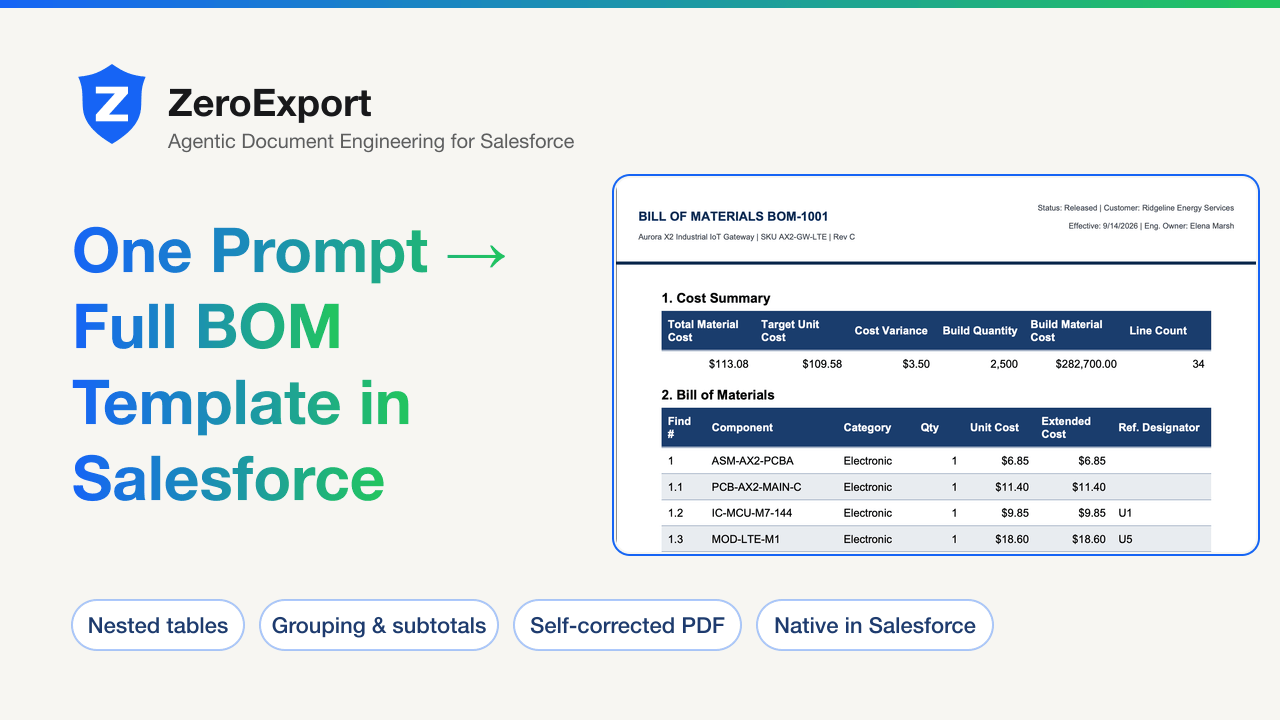
The prompt
This is the whole request Claude was given:
Using ZeroExport, create a Bill of Materials report template for the BOM__c object.
Header: BOM number, product name, SKU, revision, status, customer, effective date and engineering owner, with a page footer showing the page number.
- Cost summary: total material cost, target unit cost, cost variance, build quantity, build material cost and line count.
- Bill of materials: a table of the BOM lines ordered by line number, with find number, component, category, quantity, unit cost, extended cost and reference designator. Add a total row for extended cost.
- Cost by category: the same lines grouped by category, with an extended-cost subtotal for each category.
- Critical parts: only lines marked as critical, with their component and notes.
- Engineering changes: the related engineering changes, showing ECO number, title, change type, status, priority and unit cost impact.
- Approval: approved by and approval date.
Validate the template, import it, and generate a PDF for BOM-1001.
Video outline
| Time | Chapter |
|---|---|
| 0:00 | The output. The finished multi-page Bill of Materials PDF for BOM-1001. |
| 0:49 | One prompt to Claude. The request above, sent as-is. |
| 1:11 | Connecting to the Salesforce org. Claude connects through the ZeroExport MCP server and reads the org's objects and fields. |
| 1:27 | Claude builds the template. Data sources for the BOM, its lines and engineering changes, then the document structure section by section. |
| 3:09 | Admin design decisions. The choices left to the admin rather than guessed by the model. |
| 3:28 | Rendering and self-correcting the PDF. Claude renders a real PDF, spots a layout issue in its own output, fixes it and verifies the result. |
| 3:39 | The template in the ZeroExport builder. The imported draft, open for an admin to review and edit. |
What's in the template
- Header with product, SKU, revision, status, customer and engineering owner
- Cost summary with target unit cost and variance
- Full bill of materials in build order, with an extended-cost total
- Lines grouped by category, each with its own subtotal
- Critical parts, filtered to lines marked critical
- Engineering change history with unit cost impact
- Approval sign-off
The grouped section reuses the same BOM lines as the main table. It isn't a second report or a hand-maintained copy.
Why the result can be trusted
The model does the authoring. It doesn't do the rendering. Claude writes a template through the MCP server's tools, the template is validated before import, and the PDF is produced by ZeroExport's own engine inside Salesforce. Every document is generated natively in the org: no external servers and no layout drift between runs.
The template also lands as a draft. Nothing goes live until an admin has opened it in the builder and approved it.
Try it
Ready to try ZeroExport?
Start generating documents directly in your Salesforce org. No integrations, no setup overhead, no complexity.